
Product by % complete in MS Project Pro
Contents:
- Creating the custom column "Product by % complete" in MS Project Pro
- Creating the custom column "Product variance" in MS Project Pro
- Chat
Creating the custom column "Product by % complete" in MS Project Pro
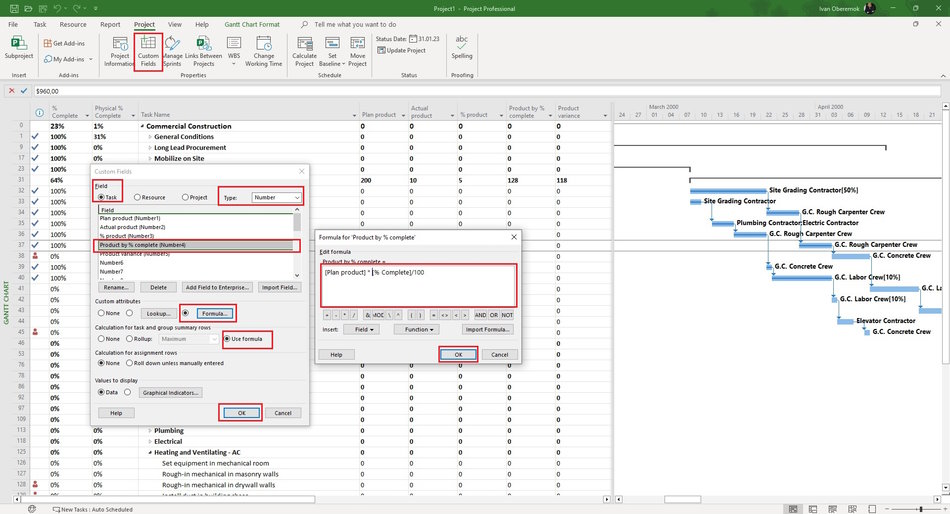
Using the % complete column and the planned number of products you can calculate how much of a task's product can be done. Let's create a column that will calculate this.
Steps to create the custom column "Product by % complete" in MS Project Pro:
- Add columns: "Plan product" and "Actual product". (Read more "Calculation "Physical % complete" in MS Project Pro")
- Click the "Custom Fields" button in the "Properties" block in the "Project" item of the top menu.
- Select field type "Task" in the "Field" block.
- Select type "Number" in the "Type:" field.
- Select the empty field in the table and click the "Rename ...." button.
- Add the "Plan by % complete" name of field.
- Click the button "Formula..." in the "Custom attributes" block.
- Add the formula "[Plan product] * [% Complete]/100". You can use the custom column "Plan % complete" instead "% Complete". (Read more "Plan % complete in MS Project Pro")
- Click the "Ok" button in the "Formula for Product by % complete" window.
- Click the "Ok" button in the "Custom Fields" window.
Creating the custom column "Product variance" in MS Project Pro
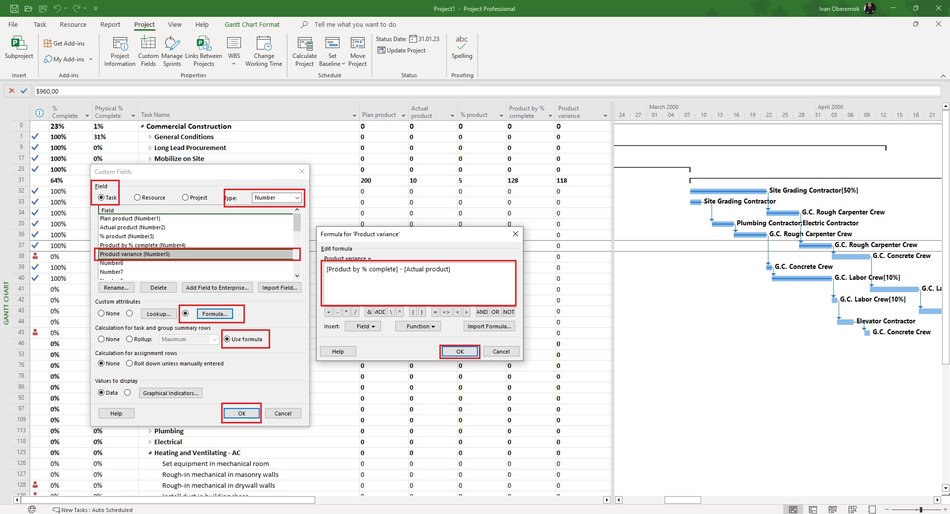
Let's add a column that will calculate the difference between the actual amount of the product and the calculated one.
Steps to create the custom column "Product variance" in MS Project Pro:
- Click the "Custom Fields" button in the "Properties" block in the "Project" item of the top menu.
- Select field type "Task" in the "Field" block.
- Select type "Number" in the "Type:" field.
- Select the empty field in the table and click the "Rename ...." button.
- Add the "Plan % complete" name of field.
- Click the button "Formula..." in the "Custom attributes" block.
- Add the formula "[Product by % complete] - [Actual product] ".
- Click the "Ok" button in the "Formula for Product variance" window.
- Click the "Ok" button in the "Custom Fields" window.
#projectmanagment, #projectscopemanagement, #monitoringandcontrollingprocess, #msprojectpro, #oberemokii

Author: Ivan Oberemok
