Project management and Enterprise project management education
We help you learn project management and develop enterprise project management system
We can help you
- Сustomize your project management system.
- Train your company's specialists.
- Develop project templates.
- Develop and improve project management processes.
- Develop reports (MS Power BI and MS Excel).
Software Products
- Microsoft Project Server.
- Microsoft SharePoint.
- Microsoft Project Pro.
- Microsoft Teams.
- Microsoft Planner.
- Microsoft Excel.
- Microsoft Power BI.
Types of companies
- Construction companies.
- Architectural companies.
- Manufacturing companies.
- Energy companies.
- Public organizations.
For whom:
- Project Office Leaders.
- Project Office Analysts.
- Portfolio Managers.
- Project Managers.
- Project Management Process Participants.
Results upon completion
- A customized project management system.
- Customized templates of typical company projects.
- Reports based on data from your systems in MS Power BI and/or MS Excel.
- Video recording of the meeting for review and training.
- Multiple professionalization in portfolio management and multiple project management.
- Increased credibility and confidence through acquiring unique skills and experience in systemic project and portfolio management.
Consultant
Ivan Oberemok
Ph.D., trainer-consultant for project management
- Candidate of technical sciences in the field of "Project management and production development", associate professor of KNUSA
- Certified Project Manager Level B International project management association
- Certified Project Manager Level C Japanese project management association
More information
Format: Meetings in Zoom or Microsoft Teams
Types:- Duration: 1 hour. Cost: $100.00 per hour
- Duration: 8 hours. Cost: $750.00 per 8 hours
- Duration: unlimited time. Cost: $1800.00 per month
Number of participants: Unlimited.
Managing deadlines and content
- Preliminary server setup
- Development of a register of requests for a project
- Filling the register of requests for a project
- Development of corporate templates for project schedules (tasks and deadlines), in which:
- Approved list of strategic objectives of projects.
- Assigned persons responsible for project tasks.
- Approved structural breakdown of project tasks.
- Logical connections that are caused by the specifics of the work and the legislative framework are identified.
- Formation of a portfolio of projects. Creating projects based on the registry and in each project:
- Due dates have been updated.
- Established project deadlines.
- Optimization of project timing.
- Maintaining a baseline project schedule.
- Setting the fact of completing and updating project tasks
- Project time variance report in MS Power BI
- Report on responsible persons in MS Excel
- Corporate columns (strategic objectives and milestones, graphical columns of deviations by deadlines)
- Views on working with deadlines (View on monitoring the timing of a project portfolio, a view on planning project tasks, a view on monitoring the timing of project tasks,)
- Configured rights of project managers in MS Project Online to work with tasks and lines
- Configured rights of project office specialists in MS Project Online to work with tasks and lines
- Setting up custom columns for analytical output
- Representations on working with deadlines (representation on those responsible for the project)
Cost and contractor management
- Creating budget resources in the corporate pool
- Assigning budget resources to projects
- Creation of costly resources.
- Assigning costly resources to projects
- Report on project costs and budgets
- Development of administrative projects
- Planning costs and budgets in administrative projects
- Establishing the fact of project costs
- Establishing the fact that project budgets have been spent
- Defining the structure of contractors (custom fields: lots, contracts)
- Creating Contractors in a Resource Pool
- Assigning contractors to project tasks
- Report on the work of project contractors
- Establishing the fact that tasks are completed by contractors
- Creation of universal cost resources in the corporate pool
- Updating project templates with universal cost resources
- Corporate columns (deviation for budget implementation, percentage of completion for costs, project agreements, project counterparties, etc., depending on the customer’s requirements and final analytics)
- Cost Views (Project Portfolio Cost Tracking View, Project Cost Tracking View, Contractor Task Views in Projects)
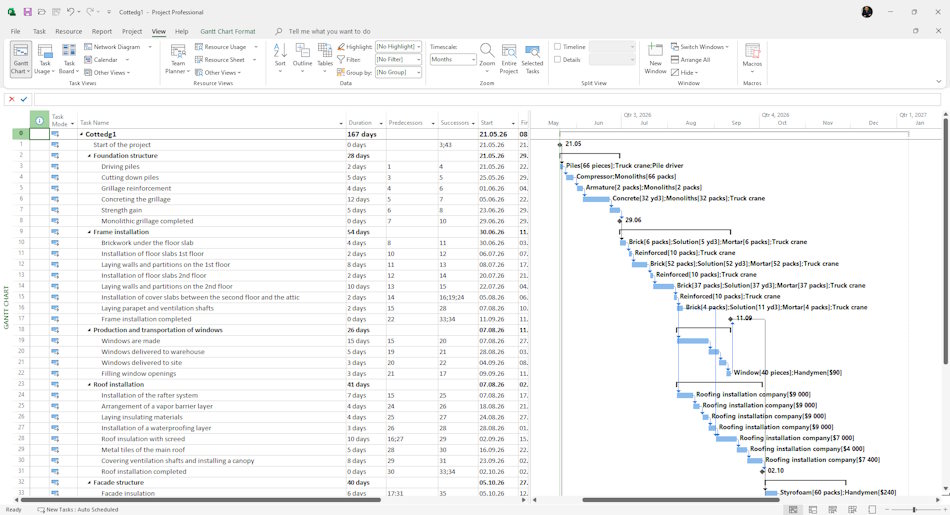
Management of material and labor resources
- Determining the structure of resources in the corporate pool
- Description of material resources and equipment in the resource pool
- Assigning material resources and equipment to project tasks
- Description of executors in the resource pool
- Assigning performers to project tasks
- Analysis of performer load and their optimization.
- Establishing the fact of labor costs of project resources
- Performer Load Report
- Worker loading optimization report
- Creating generic resources in an enterprise pool
- Updating project templates with universal labor and material resources
- Corporate Columns (Company Resource Breakdown, Resource Groups, Resource Departments)
- Views on working with performers (views on monitoring project resources, views on monitoring project resources, views on performers to establish the fact of completion)
Contact us:
To order the service, please contact our account manager Natalia.
Instuments for communication:
- Send email: info@pmhub.pro
- Write to Telegram: +38 (097) 906-95-62. Send request
- Write on Whatsapp: +38 (097) 906-95-62. Send request
- Write on Viber: +38 (097) 906-95-62. Send request
- Call the phone: +38 (097) 906-95-62
Documents
"Portfolio stakeholder analysis in MS Excel" is a report aimed at analyzing the stakeholders of the project portfolio. Project office specialists analyze the stakeholders of all projects in the portfolio.
Document: Portfolio stakeholder analysis in MS Power BI
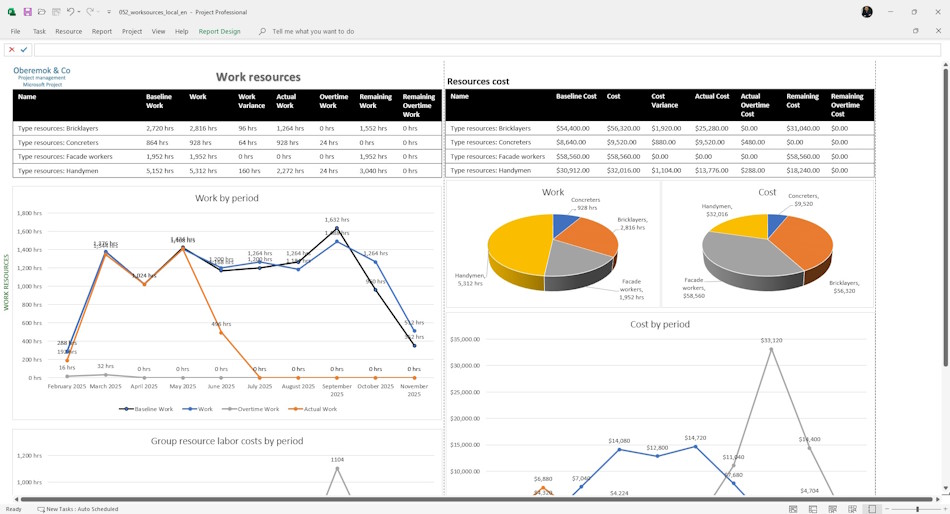
Portfolio Workforce Analysis Dashboard in MS Excel is a tool that allows you to control the planning, procurement and use of labor resources in the portfolio.
Document: Server portfolio labor resource analysis in MS Excel
The labor resource availability analysis dashboard in MS Power BI is a tool that allows you to analyze the level of workload of employees, teams and equipment of the company involved in the implementation of projects.
Document: Analysis of server labor resource availability in MS Power BI
Portfolio Workforce Analysis Dashboard in MS Power BI is a tool that allows you to control the planning, procurement and use of labor resources in the portfolio.
Document: Server portfolio labor resource analysis in MS Power BI
The labor resource availability analysis dashboard in MS Excel is a tool that allows you to analyze the level of workload of employees, teams and equipment of the company involved in the implementation of projects.
Document: Analysis of server labor resource availability in MS Excel
The "Current Project Tasks" report in MS Power BI is used by project office specialists to analyze current project tasks. The report allows you to monitor current tasks of portfolio projects and point out problems to project managers.