
Planning the budget and the cost for risks in MS Project Pro
Contents:
- Planning budgets and costs for risks in task usage view in MS Project Pro
- Planning budgets and costs for risks in resource usage view in MS Project Pro
- Chat
Planning the budget and the cost for risks in task usage view in MS Project Pro
You can specify a budget for risks in the system and reserve costs for tasks to minimize the reduce the negative effects of the occurrence of risks.
Steps to plan the budget and the cost for risks in task usage view in MS Project Pro:
- Add the risk budget for risks. (Read more "Add the budget cost resource in MS Project Pro")
- Add the cost resoirce for risks. (Read more "Creating cost resources in MS Project Pro")
- Open the task usage view.
- Add columns: "Baseline Budget Cost", "Budget Cost", "Baseline Cost", "Cost" and "Resource Names".
- Click the "Task Usage Format" item in the top menu.
- Click the "Add Details" button and add fields: "Budget Cost" and "Cost".
- Assign the budget resource in the project summary task.
- Set the amount of budgets and risks on tasks in the "Budget Cost" column
- Assign the cost resource for risks to tasks
- Click the "View" item in the top menu.
- Set the "Level 1" in the "Outliine" menu.
- Assign the cosrt resource of risks in the tasks level 1.
- Set the amount of reserves and risks on tasks in the "Cost" column.

Planning the budget and the cost for risks in resource usage view in MS Project Pro
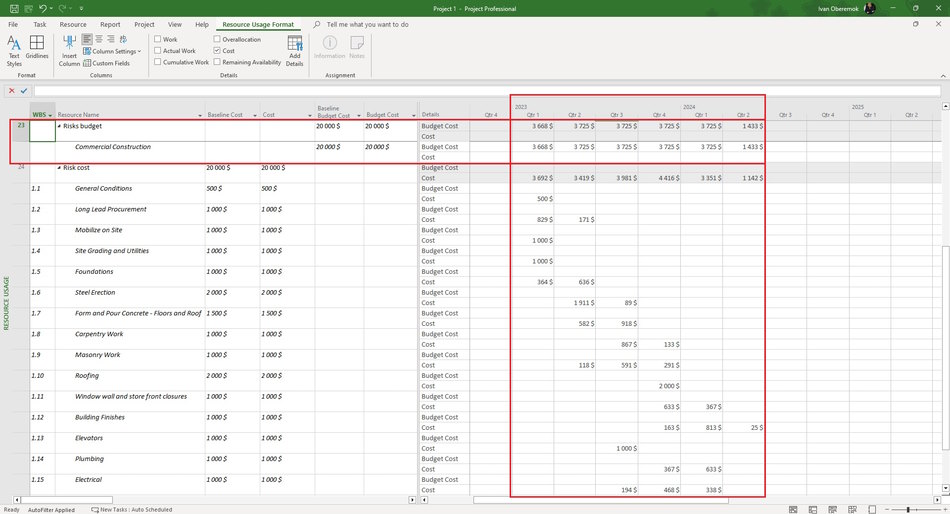
Steps to plan the budget and the cost for risks in resource usage view in MS Project Pro:
- Open the task resource view.
- Add columns: "Baseline Budget Cost", "Budget Cost", "Baseline Cost", "Cost" and "Resource Names".
- Click the "Resource Usage Format" item in the top menu.
- Click the "Add Details" button and add fields: "Budget Cost" and "Cost".
- Set the amount of budgets and risks on tasks in the "Budget Cost" column
- Set the amount of reserves and risks on tasks in the "Cost" column.
#msprojectpro, #oberemokii, #projectmanagment, #projectriskmanagement, #planningprocess

Author: Ivan Oberemok
