
Assigning material resources in MS Project Pro
Contents:
- Assigning material resources in the Gantt chart view in MS Project Pro
- Assigning material resources in the task usage view in MS Project Pro
- Assigning material resources in the resource usage view in MS Project Pro
- Chat
Assigning material resources in the Gantt chart view in MS Project Pro
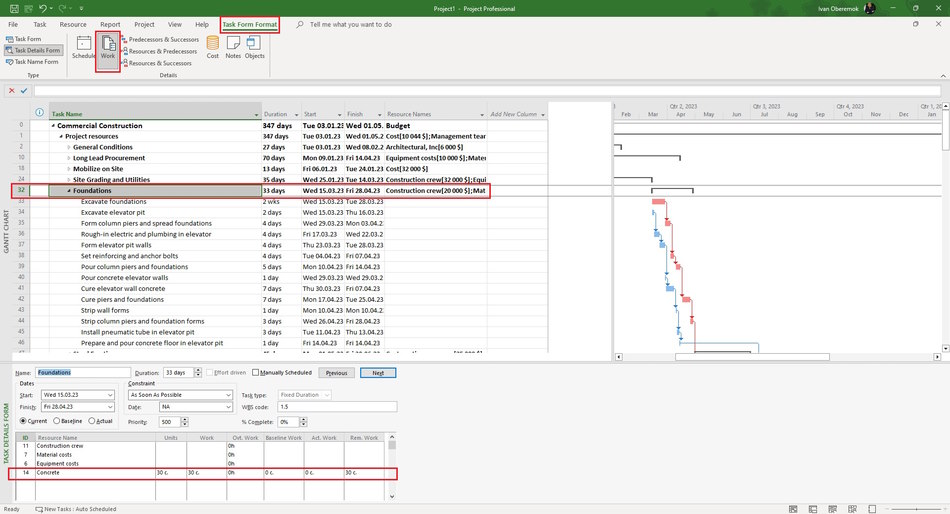
Steps to assign material resources in the Gantt chart view in MS Project Pro:
- Click the "Task" item in the top menu.
- Click the "Details" item in block "Properties".
- Click the "Task Form Format" item in top menu for window "Task details from".
- Click the "Work" item in block "Details"
- Choose resources in the window "Task details from" in the "Resource Name" field.
- Enter units for each assigning material resources in the 'Units" field.
- Click the "OK" button.
Clarification of the assignment of material resources in the task usage view in MS Project Pro
Steps to clarification of the assignment of material resources in the task usage view in MS Project Pro:
- Open the task usage view.
- Add columns: "Cost", "Work", "Baseline Cost", "Variance" and "Resource Names".
- You can replace the resource in the "Resource Names" column.
- Enter amount of material resource in the "Work" column.
- Compare the task cost value with its baseline cost. If you used a cost resource to describe a cost resource then you need to reduce the amount of the cost resource by the cost amount of the cost resource.
- Click the "Task Usage Format" item in the top menu.
- Click boxs: "Cost" and "Work".
- Set the monthly time period. (Read more "Timescale in MS Project Pro")
- Specify the amount of resources for the period in the "Work" field on the right part.

Clarification of the assignment of material resources in the resource usage view in MS Project Pro
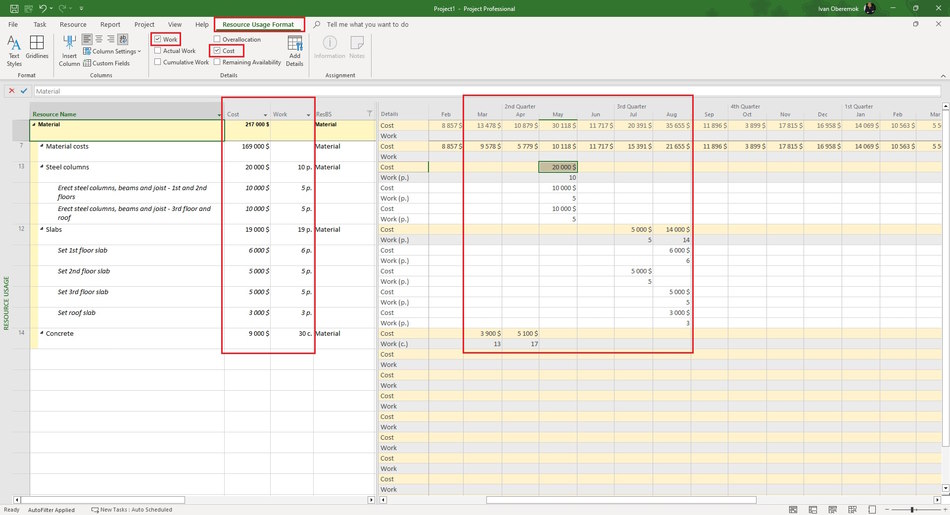
Steps to clarification of the assignment of material resources in the resource usage view in MS Project Pro:
- Open the resource usage view.
- Add columns: "Cost" and "Work".
- Specify the amount of material resource in the "Works" column.
- Click the "Resources Usage Format" item in the top menu.
- Click boxs: "Cost" and "Work".
- Set the monthly time period. (Read more "Timescale in MS Project Pro")
- Specify the amount of resources for the period in the "Work" field on the right part.
#msprojectpro, #oberemokii, #projectmanagment, #projectresourcemanagement, #planningprocess

Author: Ivan Oberemok
