
Top-Down cost planning in MS Project Pro
Contents:
Top-Down cost planning in MS Project Pro
Top-down cost planning method involves the distribution of project costs from the total amount to the costs of specific tasks. This method is used to estimate project costs in advance. We recommend allocating costs from the top level to the bottom.
Steps to set fixed cost in summary tasks in MS Project Pro:
- Determine the project budget.
- Click the "View" item in the top menu.
- Click the "Tables" buttom in the "Data" block.
- Select the "Cost" table.
- Click the "Outline" buttom in the "Data" block.
- Select the "Level 1".
- Set the costs for top-level tasks in the "Fixed Cost" column.
- if you have summary tasks at the second level, you can describe costs for this tasks:
- Click the "Outline" buttom in the "Data" block.
- Select the "Level 2".
- Set costs for second level tasks in the "Fixed Cost" column.
- Reduce the cost of top-level tasks by the amount of the cost of lower-level tasks.
- Set the baseline (Read more "Project baseline in MS Project Pro").

Steps to set fixed cost in MS Project Pro:
- Set summary tasks by cost.
- Click the "View" item in the top menu.
- Click the "Outline" buttom in the "Data" block.
- Select the "All Subtasks".
- Set the tasks cost in the "Fixed Cost" column.
- Reduce the cost of top-level tasks by the amount of the cost of lower-level tasks.
- Set the baseline (Read more "Project baseline in MS Project Pro").
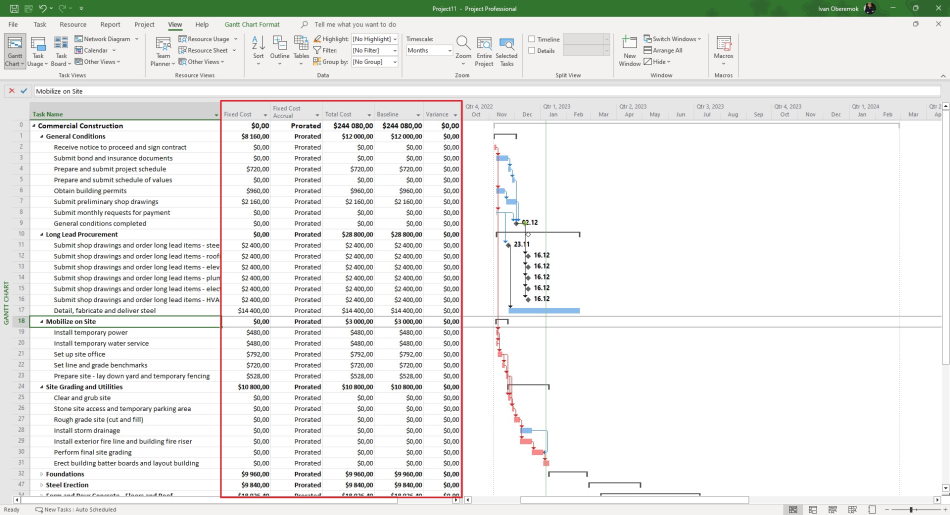
Detailed planning of fixed costs in MS Project Pro
Steps to detail fixed costs in MS Project Pro:
- Open task usage view.
- Click the "Task Usage Format" item in the top menu.
- Click the "Cost" box in the "Details" block.
- Click the "View" item in the top menu.
- Set the time period in the "Timescale" in the "Zook" block.
- Click the "Tables" buttom in the "Data" block.
- You can change the method of allocation costs to time periods in the "Fixed Cost Accrual" field:
- Prorated - The amount of costs is proportional allocation over the duration of the task.
- Start - The amount of costs set on the start date of the task.
- End - The amount of costs set on the finish date of the task.

#msprojectpro, #oberemokii, #projectmanagment, #projectcostmanagement, #planningprocess

Author: Ivan Oberemok
