
Formatting view data in MS Project Pro
Contents:
- Customizing font style for different data in MS Project Pro
- Customizing grid lines style for different data in MS Project Pro
- Chat
Customizing font style for different data in MS Project Pro
You can customize the font style for different data types in MS Project Pro.
Steps to customize font style for different data in MS Project Pro:
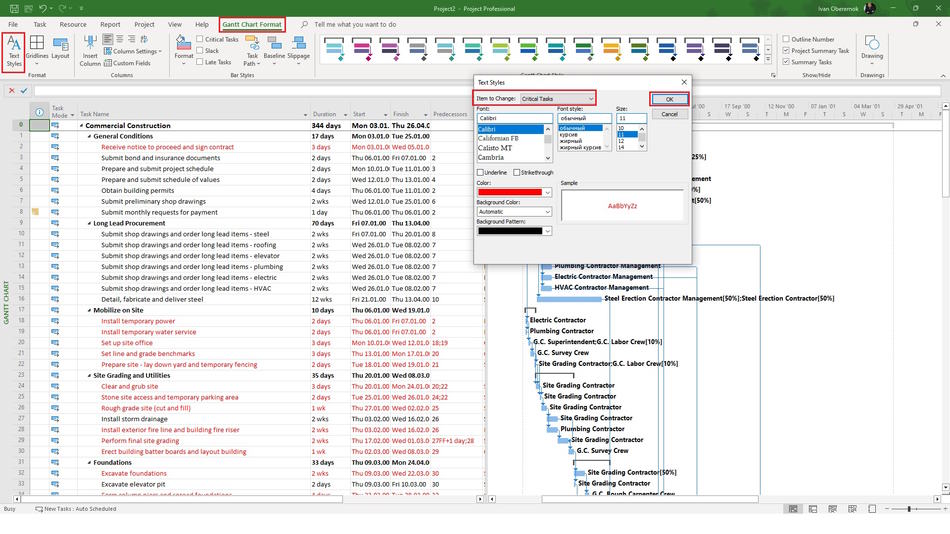
- Click the "Gantt Chart Format" item in the top menu.
- Click the "Text Styles" button in the "Format" block.
- Select the type of data in the "Item to Change" field.
- Select the font in the "Font:" block.
- Select the font style in the "Font style:" block.
- Set the font size in the "Size:" field.
- You can set underline text by clicking "Underline" box.
- You can set strikethrough text by clicking "Strikethrough" box.
- Set the font color in the "Color:" field.
- Set the font background color in the "Background Color:" field.
- Set the font background pattern in the "Background Pattern:" field.
- Click the "Ok" button.
Customizing grid lines style for different data in MS Project Pro
You can customize the grid lines style for Gantt chart bars in MS Project Pro.
Steps to customize font grid lines style for Gantt chart bars in MS Project Pro:
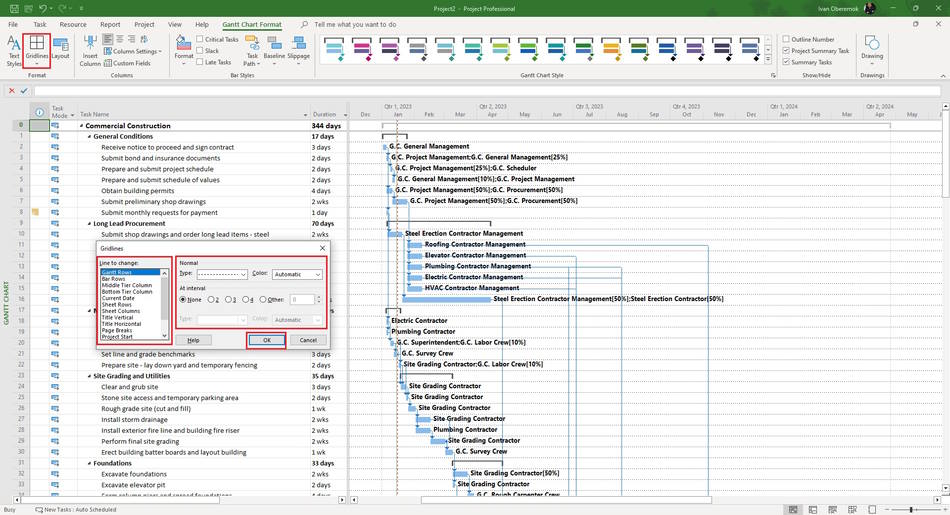
- Click the "Gantt Chart Format" item in the top menu.
- Click the "Gridlines" button in the "Format" block.
- Click the "Gridlines ..." subitem.
- Select the type of line in the "Line th change:" block.
- Select the line type in the "Type:" field.
- Select the line color in the "Color:" field.
- Set the interval in the block "At interval".
- Select the interval line type in the "Type:" field in the block "At interval".
- Select the interval line color in the "Color:" field in the block "At interval".
- Click the "Ok" button.
#msprojectpro, #oberemokii, #projectmanagment, #projectintegrationmanagement, #initiatingprocess

Author: Ivan Oberemok
