
Automatic task duration detection in MS Project Pro
Contents:
Customizing the automatic task duration detection in MS Project Pro
In MS Project Pro, the duration of tasks can be determined by relationships between the start and end dates of other tasks.
If the start date or end date of related tasks changes, MS Project Pro automatically recalculates the duration.
When changing the duration, the work is automatically recalculated if the task type is the fixed units.
When changing the duration, units are automatically recalculated if the task type is the fixed work
Steps to add task with automatic duration detection:
- Open the gantt chart
- Add the task. Don't set the task type to fixed duration.
- Stand on the start date first task.
- Click the "Copy" button in the "Clipboard" block.
- Stand on the task start date.
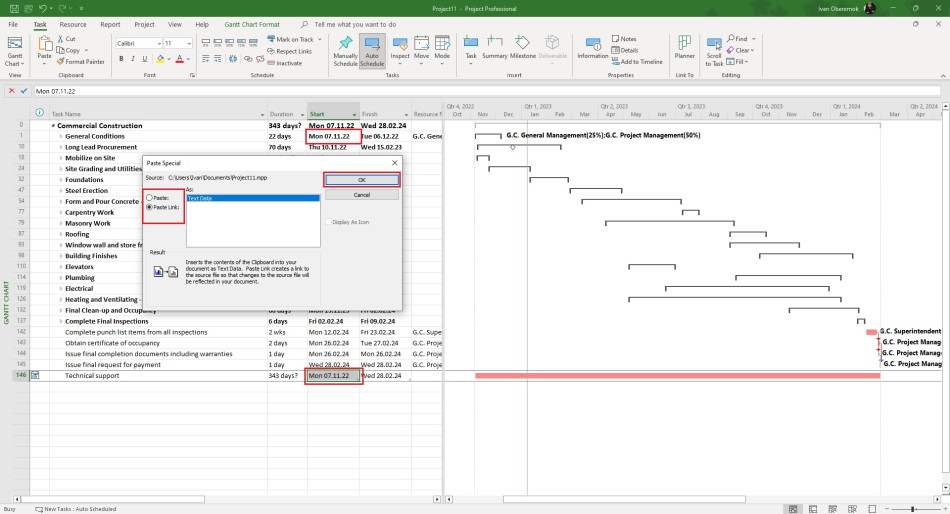
- Right click and select the "Paste Special ..." item.
- Click the "Paste link:" box.
- Set the "Text Data" row.
- Click the "Ok" button.
- Stand on the finish date last task.
- Click the "Copy" button in the "Clipboard" block.
- Stand on the task finish date.
- Right click and select the "Paste Special ..." item.
- Click the "Paste link:" box.
- Set the "Text Data" row.
- Click the "Ok" button.
#msprojectpro, #oberemokii, #projectmanagment, #projectschedulemanagement, #planningprocess

Author: Ivan Oberemok
