
Assigning resource on summary tasks in MS Project Pro
Contents:
- Assigning resource on summary tasks in MS Project Pro
- Planning resources work in summary tasks in MS Project Pro
- Chat
Assigning resource on summary tasks in MS Project Pro
At the beginning of the planning process, there is not enough information about the required resources. Therefore, you can assign resources to summary tasks. Estimate of the work can be approximate
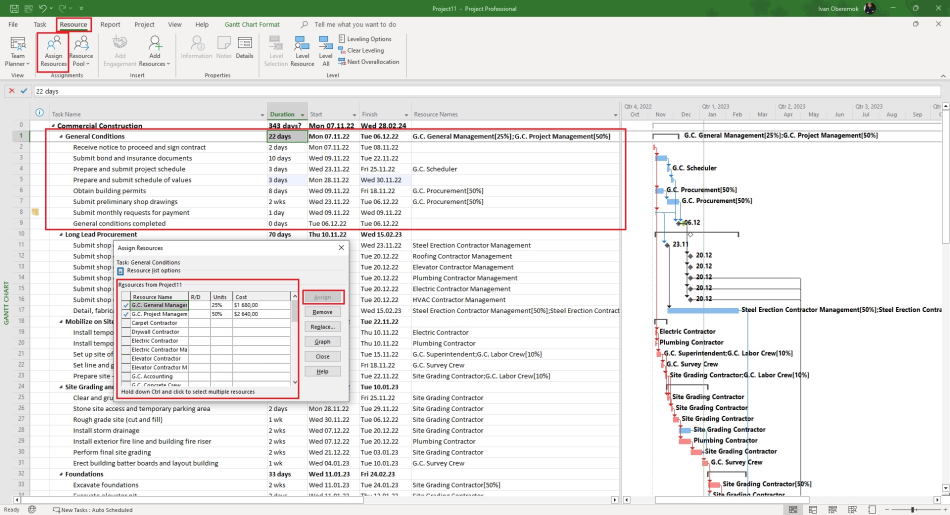
Steps to assigne resource on summary tasks in MS Project Pro:
- Open the Gantt Chart view.
- Select the summary task.
- Click the "Resource" item the top menu.
- Click the "Assign Resources" button in the "Assignments" block.
- Select resources and lick the "Assign" button.
- Click the "Close" button.
Planning resources work in summary tasks in MS Project Pro
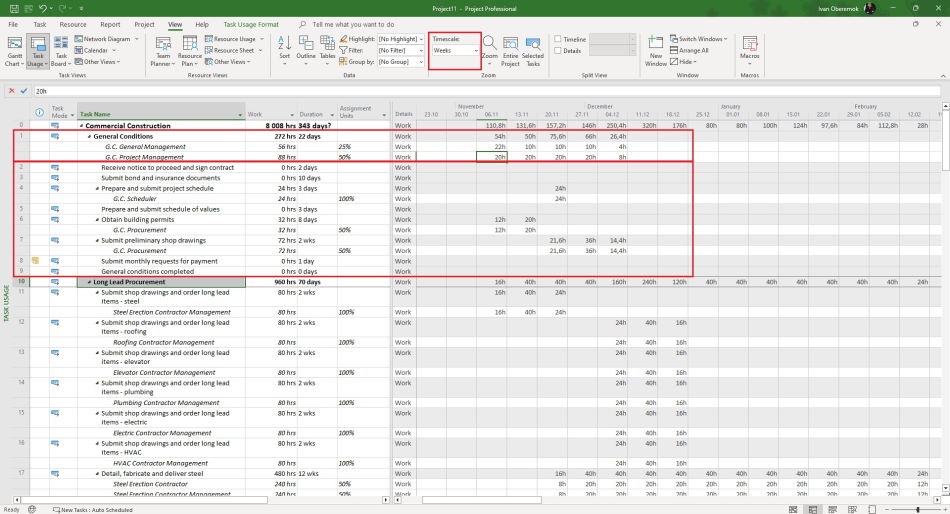
You can specify the approximate resource work in the summary tasks for a period of a month or a week.
Steps to Planning resources work in summary tasks in the task usage view:
- Open the task usasge view.
- Click the "View" item in the top menu.
- Set the time period in the "Timescale" field in the "Zoom" block. We recommend to set the "Week" or "Month".
- Click the "Task Usage Format" item in the top menu.
- Click the "Work" box in the "Details" block.
#msprojectpro, #oberemokii, #projectmanagment, #projectresourcemanagement, #planningprocess

Author: Ivan Oberemok
