
WBS code in MS Project Pro
Contents:
WBS code in Microsoft Project
WBS code are project management tools for describing tasks.
MS Project give you enter WBS code in field "WBS". Enter WBS code from top level to down.
Step to enter WBS code in plan in MS Project:
- Open "Gantt Chart" in your plan.
- Click item "Gantt Chart Format" on the top menu and click item "Insert Column" on the group "Columns".
- Add column "WBS" in table.
- Enter WBS code for each tasks. Enter WBS code from top level to down. You can user tools "Outline" in the item "View" of the top menu in block "Data".

Create WBS code in MS Project
Steps creating WBS in MS Project:
- Click the "WBS" on the "Project" tab, in the "Properties" group.
- Click the item "Define Code...".
- You can describe project's type use field "Project Code Prefix".
- You must set the WBS code mask. Decide how many levels should be in the WBS code.
- You choose type of display WBS code in field "Sequence".
- You can limit the number of characters in field "Lenght". If you do not want set the number of characters you will set value "Any"
- You must set character of separator. Default character of separator is ".".
- If you want the system to generate the WBS code for new task you will set item "Generate WBS code for new task".
- The system will not give you uniqueness WBS if you set item "Verife uniqueness for new WBS codes".

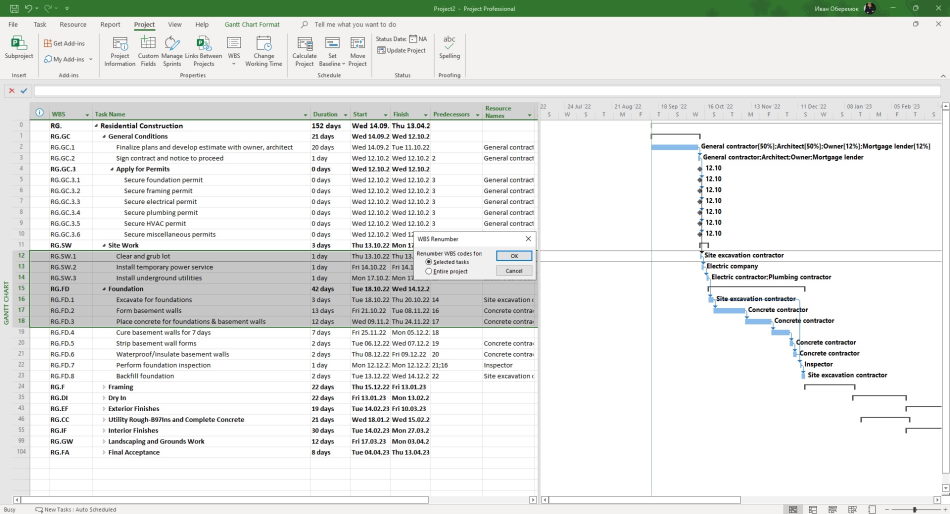
You can renumber WBS code for all tasks in the plan in MS Project.
Step to renumber WBS code:
- Click the "WBS" on the "Project" tab, in the "Properties" group.
- Click the item "Renumber...".
- If you want renumber WBS code for all task plan you will set item "Entire project".
- If you want renumber WBS code only selected task you will set item "Selected tasks". Before that you must selected tasks.
#msprojectpro, #oberemokii, #projectintegrationmanagement, #initiatingprocess

Author: Ivan Oberemok
