
Setting project dependencies in a strategy in MS Project Server
Contents:
- Setting dependencies between projects in a strategy in MS Project Server
- Connection type “Dependency” between projects in a strategy in MS Project Server
- “Mutual inclusion” relationship type between projects in a strategy in MS Project Server
- “Mutual exclusion” relationship type between projects in a strategy in MS Project Server
- "Finish-to-start" relationship type between projects in a strategy in MS Project Server
- Chat
Setting dependencies between projects in a strategy in MS Project Server
The connection between projects during analysis allows you to form a project portfolio that takes these connections into account.
To establish connections between projects:
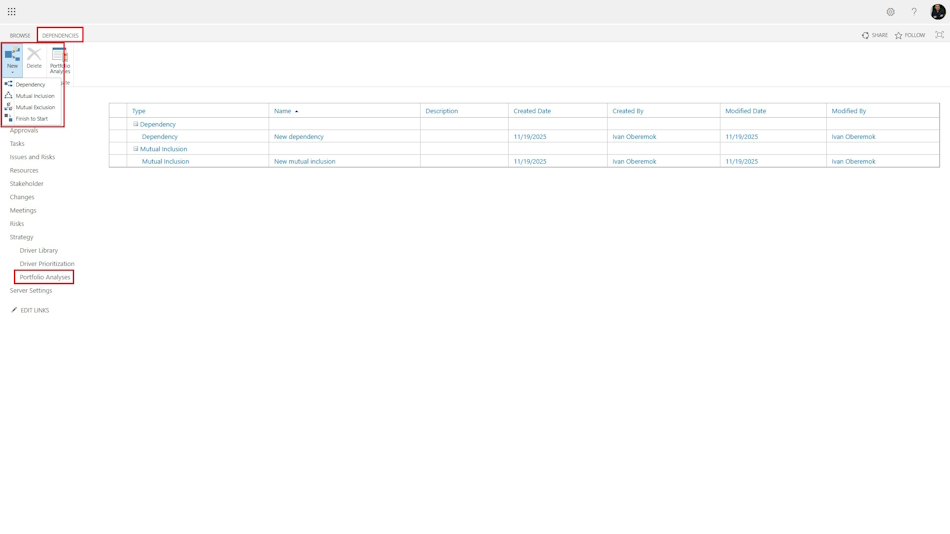
- Go to the “Strategy” menu item in the “Portfolio Analyses” section.
- Click on the “Project Dependencies” button in the top “Analyses” menu.
- To create a dependency, click on “New”
- Here you can create the following links:
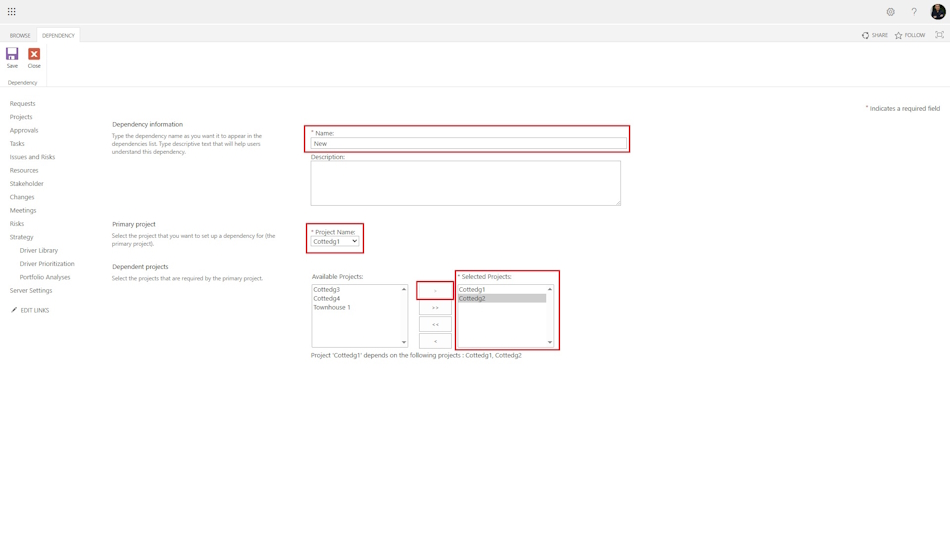
- The “Dependency” link, one main project is selected and several projects are selected for it that must be built if the main project is implemented.
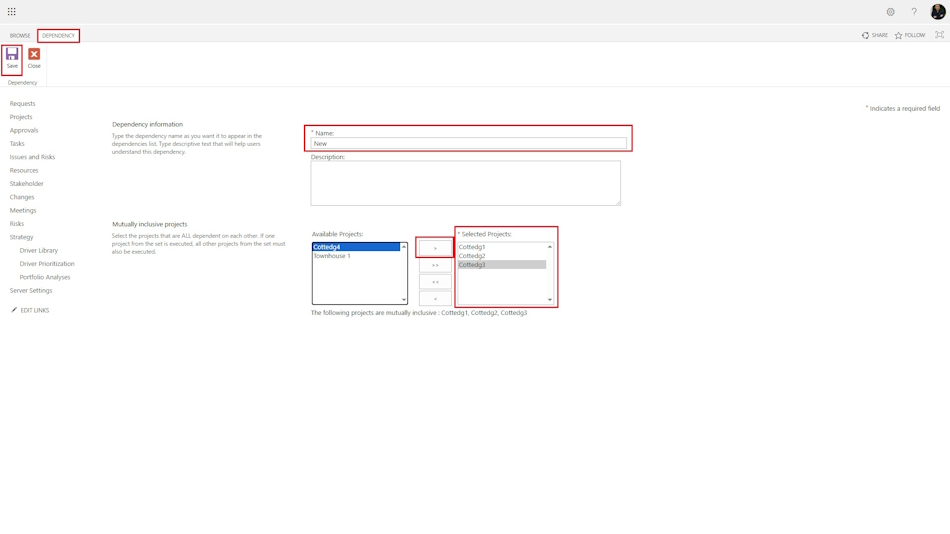
- The “Mutual inclusion” link, a list of projects is specified that must all be implemented together.
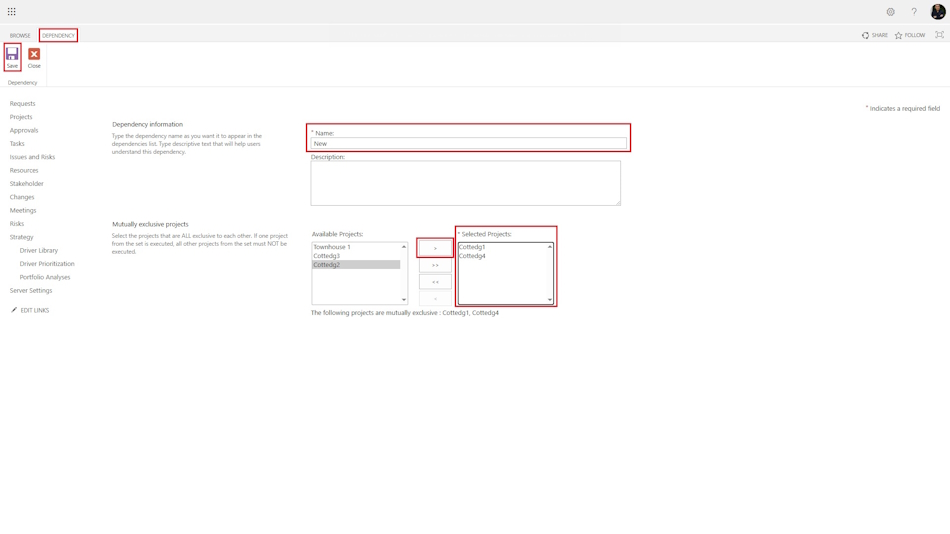
- The “Mutual exclusion” link, projects are specified, only one of which can be implemented.
- The “Finish-to-Start” relationship, one main project is selected, along with all projects that must be implemented after the main project is completed.
Connection type “Dependency” between projects in a strategy in MS Project Server
To create a dependency type “Dependency”:
- Select “Dependency” in the “Dependencies” menu.
- In the window that opens, enter the name of the link in the “Name” field.
- Select the main project after which other projects will be implemented in the “Project Name” field.
- Select the projects to be implemented in the “Dependent projects” block.
- To save, click the “Save” button in the top menu.
“Mutual inclusion” relationship type between projects in a strategy in MS Project Server
To create a “Mutual inclusion” dependency type:
- Select “Mutual inclusion” in the “Dependencies” menu.
- In the window that opens, enter the name of the relationship in the “Name” field.
- In the “Dependent projects” block, select the projects that will be implemented together.
- To save, click the “Save” button.
“Mutual exclusion” relationship type between projects in a strategy in MS Project Server
To create a “Mutual exclusion” dependency type:
Select “Mutual exclusion” in the “Dependencies” menu.
In the window that opens, enter the name of the relationship in the “Name” field.
In the “Dependent projects” block, select the projects that should not be implemented together.
To save, click the “Save” button.
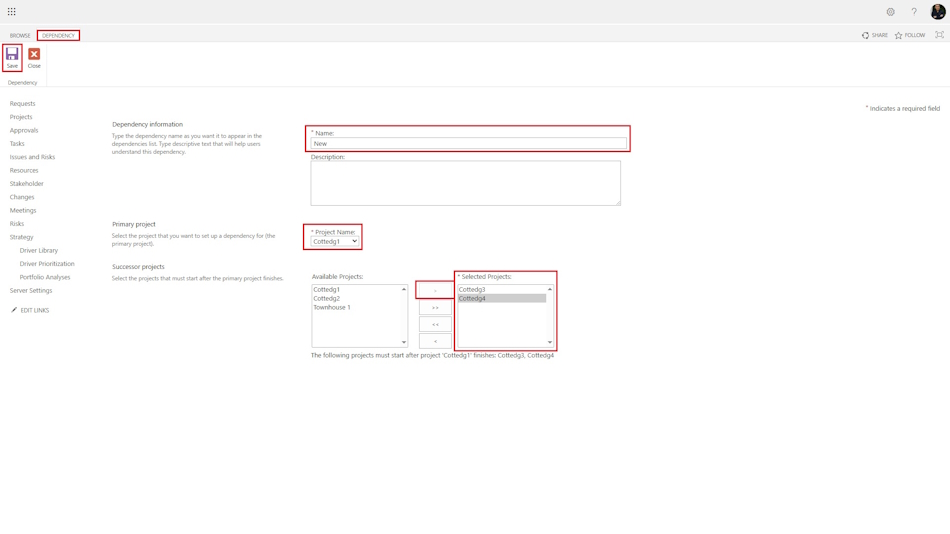
"Finish-to-start" relationship type between projects in a strategy in MS Project Server
To create a dependency type “Finish-to-start”:
- Select the “Finish-to-start” item in the “Dependencies” menu.
- In the window that opens, enter the name of the link in the “Name” field.
- Select the first project after which other projects will be implemented in the “Project Name” field.
- Select the second projects to be implemented in the “Dependent projects” block.
- To save, click the “Save” button in the top menu.
#projectportfoliomanagement, #projectcostmanagement, #initiatingprocess, #msprojectserver, #oberemokii

Author: Ivan Oberemok
