
Register of project portfolio materials in MS Excel
Contents:
- Using the portfolio materiel register in MS Excel
- Analyzing the quantity and cost of materials of the project portfolio in MS Excel
- Customization of the “Acts of completed works of the project portfolio” register in MS Excel
- Chat
Using the portfolio materiel register in MS Excel
The reason for the task of the document “Project Portfolio Material Register” in MS Excel is to plan and track the material resources of the project portfolio. Material resources in the project schedule are already allocated to tasks, while material resources arrive at the warehouse or project sites in other batches and are then allocated to tasks. In addition, we can plan and track payments for material resources. This is a tool used by project trimming managers.
The tasks of the document include:
- Scheduling and recording receipt of material resources.
- Planning and recording payments for material resources.
- Analyzing the quality of material resource planning.
- Analyzing payments for material resources.
On the “Material resources” page, we plan and record the receipt of resources. When entering data on material resources, we specify:
- Project - name of the project in the portfolio
- Contractor - the name of the company or individual who sends the materials.
- Contract - number and date of the contract on the basis of which we receive the materials.
- Resource type - name of the resource group.
- Resources - name of the material resource
- Date - the date of receiving the material.
- Quantity - the quantity of the material we receive.
- Price - price of the material.
- Cost - cost of the material batch
- Plan_Fact - the field has the values “Plan” or “Actual”. This separates the planned and actual receipt of materials.
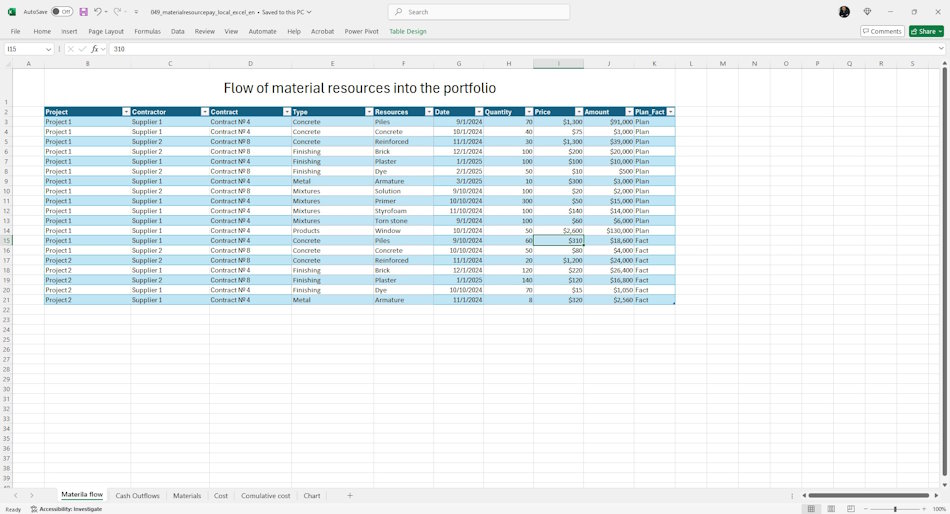
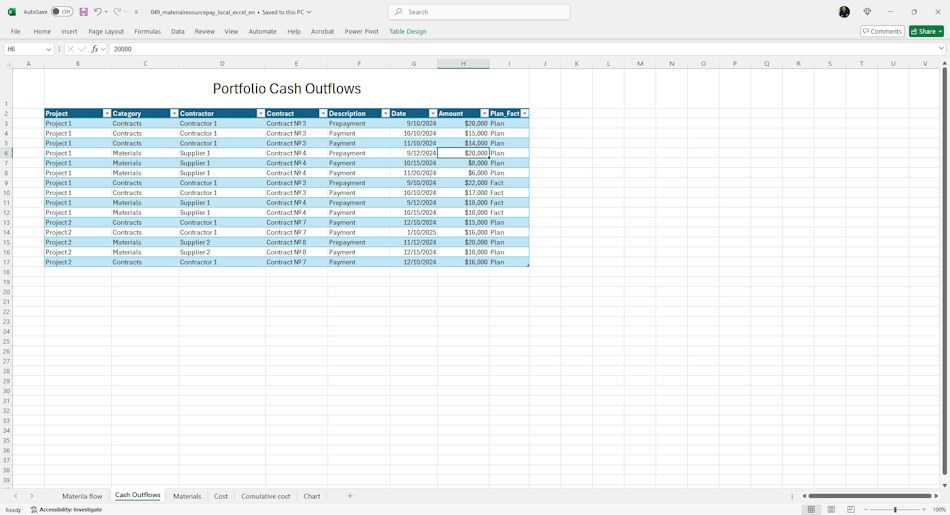
On the “Payments” page, you schedule and record payments in the project portfolio.
When describing payments you specify:
- Project - name of the project in the portfolio
- Article - the article by which the payment will be recorded.
- Counterparty - the name of the company or individual who makes the payment.
- Contract - number and date of the contract on the basis of which we make the payment.
- Payment description
- Payment date
- Payment amount
- Type - the field has the values “Plan” or “Actual”. This separates planned and actual payments.
Analyzing the quantity and cost of materials of the project portfolio in MS Excel
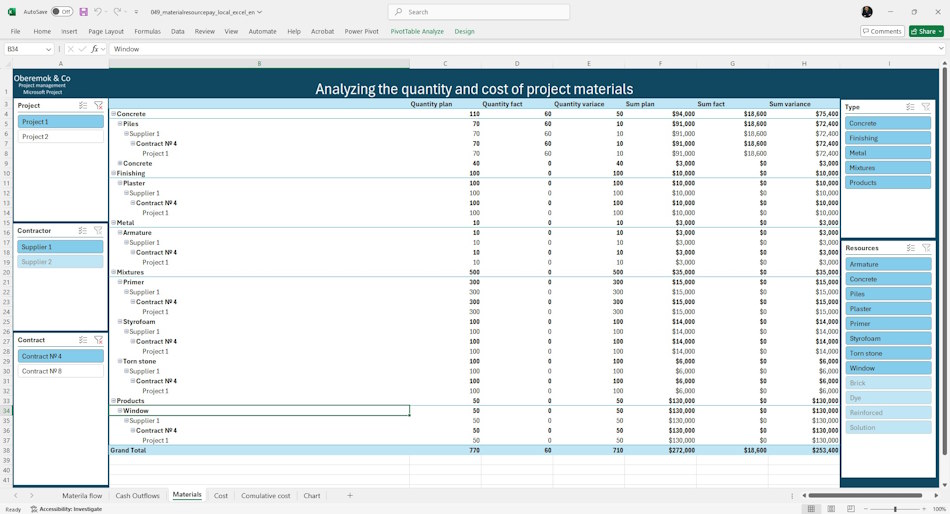
On the basis of the materials data of the portfolio of projects the general information on the quantity and costs of the portfolio of projects is calculated. The calculation provides planned and actual information about the material inputs to the portfolio.
The table presents the following information:
- Quantity plan - the quantity of materials planned for delivery.
- Quantity actual - quantity of received materials.
- Quantity deviation - the amount of under-received materials.
- Costs plan - cost of planned materials.
- Costs actual - cost of received materials
- Deviation by costs - cost of under-received materials.
Information is organized by: Resource Type, Resource Name. Suppliers, Contracts and Projects.
The page uses filters: Project, Contract, Contractor, Resource Type and Resources.
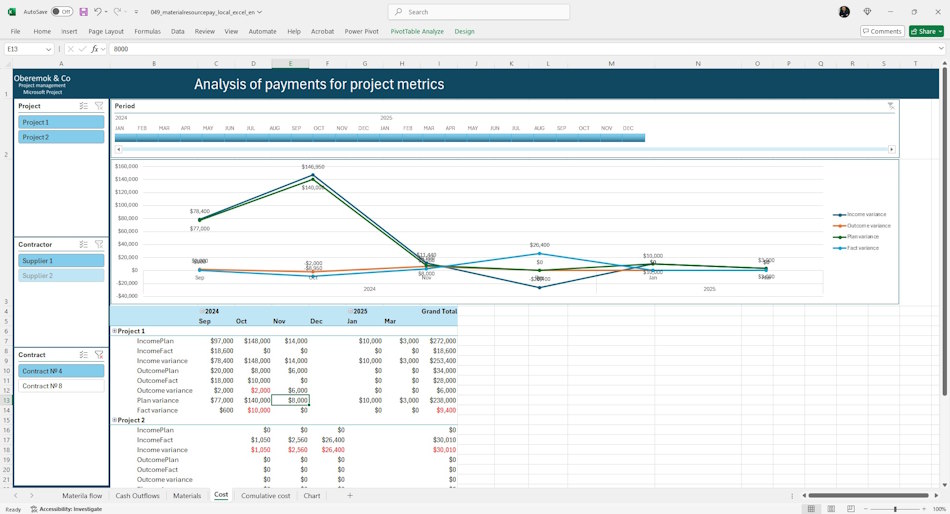
The Costs page displays information about payments for material resources and the cost of material resources within time periods. Using this information, you can draw conclusions about how well materials are delivered in each time period. You can analyze both the quality of material planning and the quality of material payment planning.
The table shows the following information:
- Payment plan - planned amount of payments for the period.
- Actual payment - the amount paid for the period.
- Payment deviation - how much the actual differs from the plan.
- Costs plan - how much materials are planned for.
- Costs actual - how much material was received.
- Cost deviation - how much the cost fact differs from the plan.
- Plan variance - the difference between planned payments and planned costs. It shows the quality of planning.
- Actual variance - the difference between actual payments and actual costs. Indicates the quality of execution.
Information is organized by: Projects, Suppliers, Contracts.
The page uses filters: Project, Contract, Contractor, Time period.
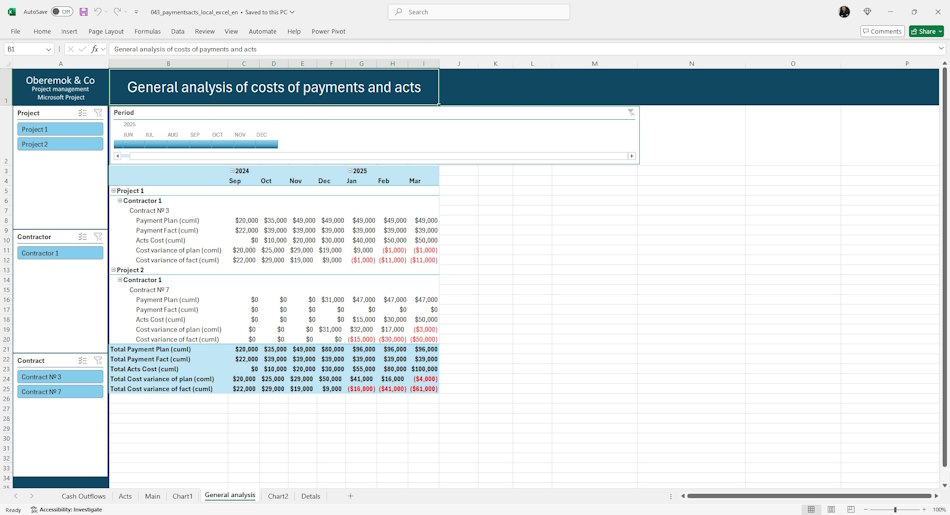
The Cumulative Totals page displays information about material payments and material costs within time periods on an accrual basis. You can analyze material payments and costs with information from previous periods.
The table provides the following information:
- IncomePlan (cml) - planned amount of payments cumulatively.
- IncomeFact (cml) - the amount paid cumulatively.
- Income variance (cml) - how much the fact differs from the plan cumulatively.
- OutcomePlan (cml) - by what amount of planned materials cumulative total.
- OutcomeFact (cml) - the amount of materials received cumulatively.
- Outcome variance (cml) - how much the cost fact differs from the plan cumulatively.
- Plan variance (cml) - the difference between planned payments and planned costs cumulatively. It shows the quality of planning.
- Fact variance (cml) - the difference between actual payments and actual costs on an accrual basis. Indicates the quality of execution.
Information is organized by: Projects, Suppliers, Contracts.
The page uses filters: Project, Contract, Counterparty, Time period.
For the convenience of control, deviation indicators are displayed on a separate chart:
- Income variance (cml) - how much the fact differs from the plan cumulatively.
- Outcome variance (cml) - how much the cost fact differs from the plan cumulatively.
- Plan variance (cml) - the difference between planned payments and planned costs cumulatively. It shows the quality of planning.
- Fact variance (cml) - the difference between actual payments and actual costs on an accrual basis. Indicates the quality of execution.
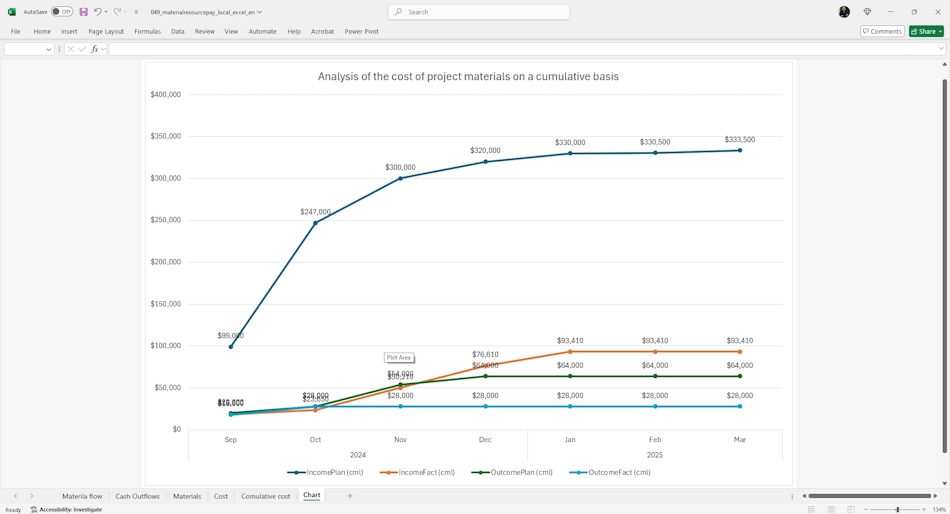
A separate graph provides information on payments and material costs on a cumulative basis.
The chart shows:
- IncomePlan (cml) - planned amount of payments cumulatively.
- IncomeFact (cml) - the amount paid cumulatively.
- OutcomePlan (cml) - by what amount of planned materials cumulative total.
- OutcomeFact (cml) - the amount of materials received cumulatively.
Customization of the “Acts of completed works of the project portfolio” register in MS Excel
How to get the document "Acts of completed works of the project portfolio" in MS Excel
- Register or log in to the site.
- Make a payment.
- Download the file with the document.
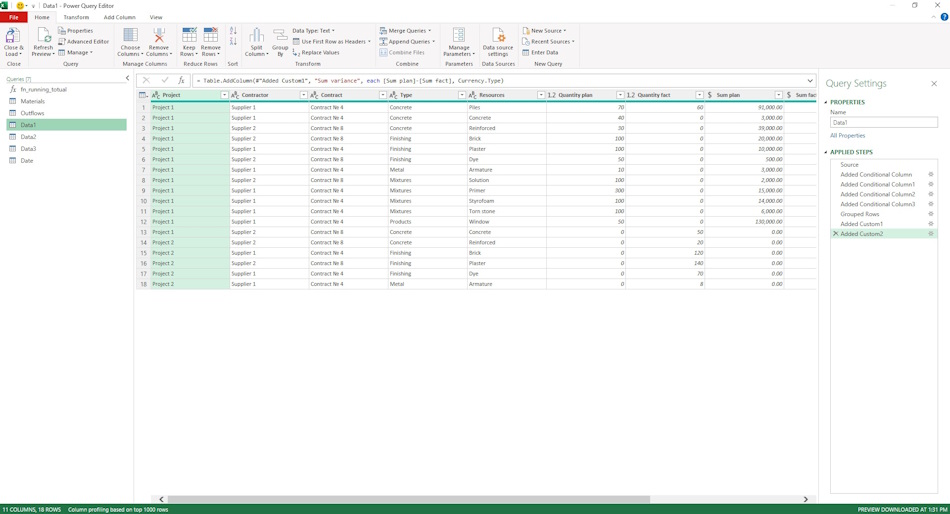
The Registry uses directories of the main fields of the Registry. They allow to ensure the convenience of filling and avoid errors and inaccuracies in filling.
The following directories are used in the registry:
- Disbursement items - a directory of the list of disbursement items in the project. The most typical items are: “Contractors”, ‘Materials’, ‘Equipment’ and ‘Mechanisms’.
- Type - the type defines whether the values are planned or actual.
- Resource type - the directory defines the types of material resources in the list.

Author: Ivan Oberemok
