
Material resources report in MS Project Pro
Contents:
- Project material resources report in MS Project Pro
- Customize “Material Resources” report in MS Project Pro
- Chat
Project material resources report in MS Project Pro
The purpose of the report is to control the quality of planning and tracking of project resource utilization. The report is used by project office specialists and project team members responsible for material resources management. The report includes
The table with general information about resources contains general information about the resource types spent and their utilization in the project. For this purpose we suggest using the following fields:
- Resource group - the name of the resource group of the project.
- Baseline cost - the approved costs of the resource group.
- Cost - the planned costs of the resource group.
- Cost Variance - the difference between the planned and approved costs of the resource group.
- Actual Cost - costs of resource groups actually spent during project implementation.
- Remaining cost - the difference between the planned and actual costs of the resource groups.
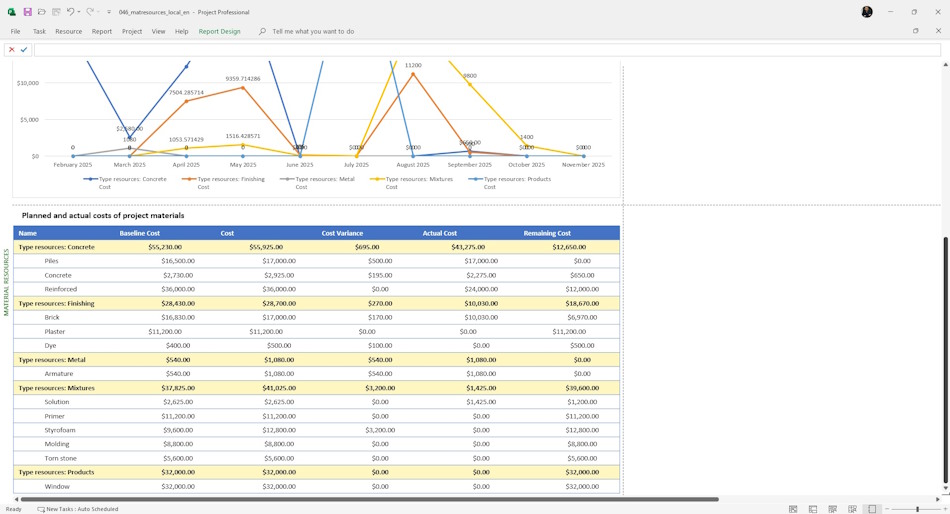
The graph shows the planned costs by resource group by time period. On this graph you can monitor the peak costs of material resources. By analyzing the peaks you can propose optimizations to reduce project costs.
In the resource quantity chart you can monitor changes in the utilization of material resources in the project. To analyze the quantity of resources, we suggest using the following fields:
- Resources - name of resources and resource groups.
- Baseline - the amount of material resources approved by the management.
- Plan - the planned quantity of material resources.
- Variance - the difference between the approved and planned quantity of material resources.
- Actual - the actual quantity of material resources.
- Remaining - the difference between the planned and actual quantity of material resources.

The lower table shows the detailed resource costs of the project. Using this table we can specify which resources need special attention. The following items are listed in this section:
- Name - the name of the project resources.
- Baseline cost - the approved costs of the resources.
- Cost - the planned costs of the resources.
- Cost variance - the difference between planned and approved resource costs.
- Actual cost - costs of resources actually spent during project implementation.
- Remaining cost - the difference between planned and actual resource costs.
Customize “Material Resources” report in MS Project Pro
How to get “Material Resources” report in MS Project Pro
- Register or log in.
- Make a token payment.
- Download the schedule with the report.
Steps to customize the “Material Resources” report in MS Project Pro
- Open the schedule plan with the report.
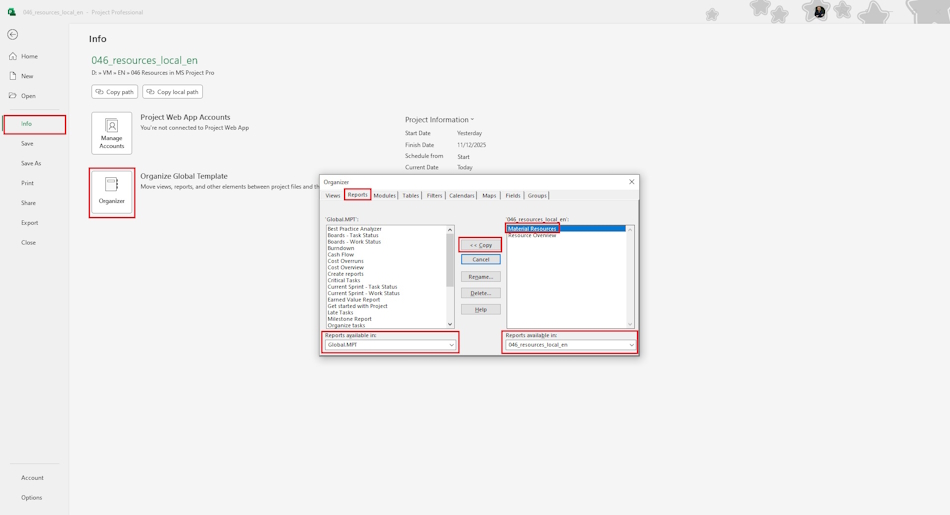
- Go to the Organizer section
- Copy the “Type resources” field
- Fill it with your resources.
- Copy the “Material Quantity” and “Material Cost” resource filters.
- Copy the Resource Type groups.
- Copy the “Material Resources” report to your project or “Global.mpt” project
- Open the report and verify the report works.
Documents
- Send email: info@pmhub.pro
- Write to Telegram: +38 (097) 906-95-62. Send request
- Write on Whatsapp: +38 (097) 906-95-62. Send request
- Write on Viber: +38 (097) 906-95-62. Send request
- Call the phone: +38 (097) 906-95-62

Author: Ivan Oberemok
