
Acts of completed works of the project portfolio register in MS Excel
Contents:
- Use of the “Acts of completed works of the project portfolio” register in MS Excel
- Customization of the “Acts of completed works of the project portfolio” register in MS Excel
- Chat
Use of the “Acts of completed works of the project portfolio” register in MS Excel
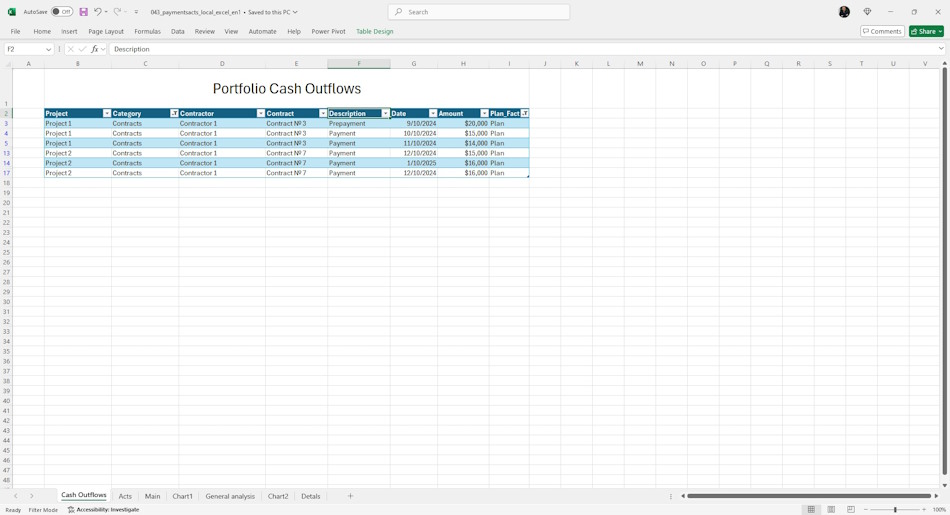
Portfolio cash outflows – a list of planned and actual payments to project counterparties for work, materials and portfolio equipment. The list of payments specifies:
- Category – the item under which the payment will be recorded.
- Contractor – the name of the company or the name of the individual making the payment.
- Contract – the number and date of the agreement on the basis of which we make the payment.
- Payment Description
- Payment Date
- Payment Amount
- Type – the field has the values “Plan” or “Fact”. This separates planned and actual payments.
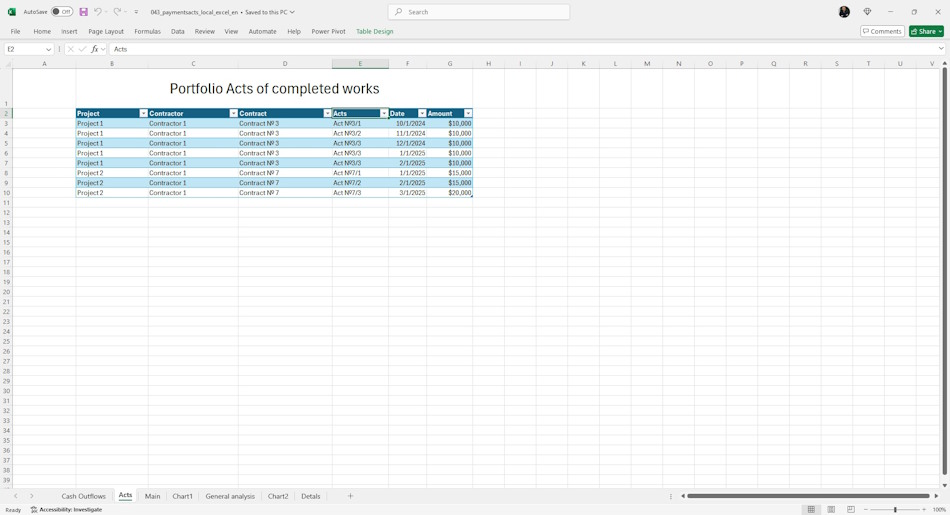
Acts of work performed in the project portfolio - list of acts of work performed to the counterparties of the project portfolio for works. The list of payments includes:
- Project - name of the project.
- Counterparty - name of the company or individual who makes the payment.
- Contract - number and date of the contract.
- Act number
- Date of the act
- Amount of the act.
Analysis of portfolio cash flow in MS Excel
Based on the data of the register of certificates of completed works of the project portfolio and the register of payments to contractors, you can answer the following questions
- To what extent payments to contractors are planned qualitatively
- To what extent the plan of payments to contractors corresponds to the actual payments.
- How much the fact of payments to contractors corresponds to the signed acts of completed works.
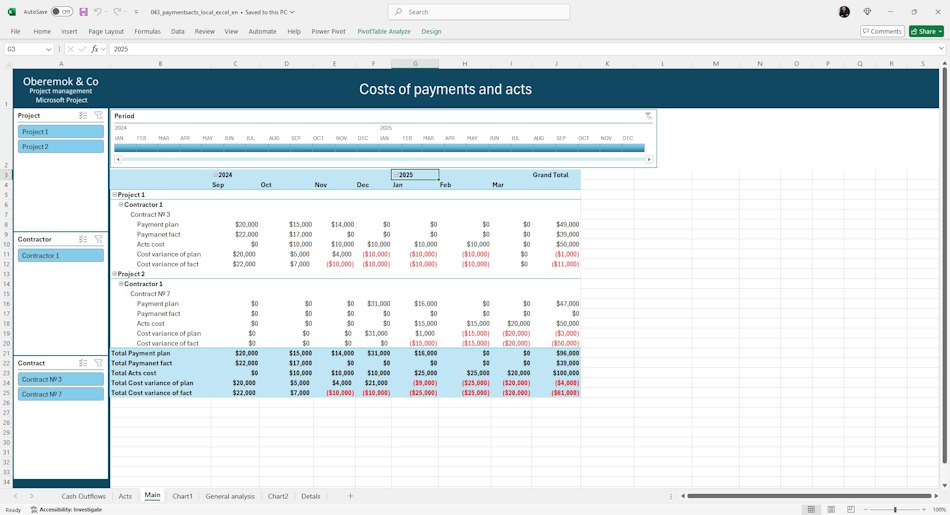
The “Main” page displays information about costs by time periods:
- Plan payments - amount of planned payments under the contract.
- Actual payments - amount of actual payments under the contract.
- Act costs - the sum of completed work acts under the contract.
- Deviation on planned payments - the difference between the costs of planned payments and the costs of acts of completed work. By this indicator you can evaluate the quality of contract payments planning.
- Deviation on actual payments - the difference between the costs of actual payments and the costs of certificates of completed works. By this indicator you can evaluate the quality of contract security.
Filters are shown on the page:
- Project - filters by project name.
- Contractor - filters by contracting organizations.
- Contract - filters by contract names.
- Period - filter by time periods.
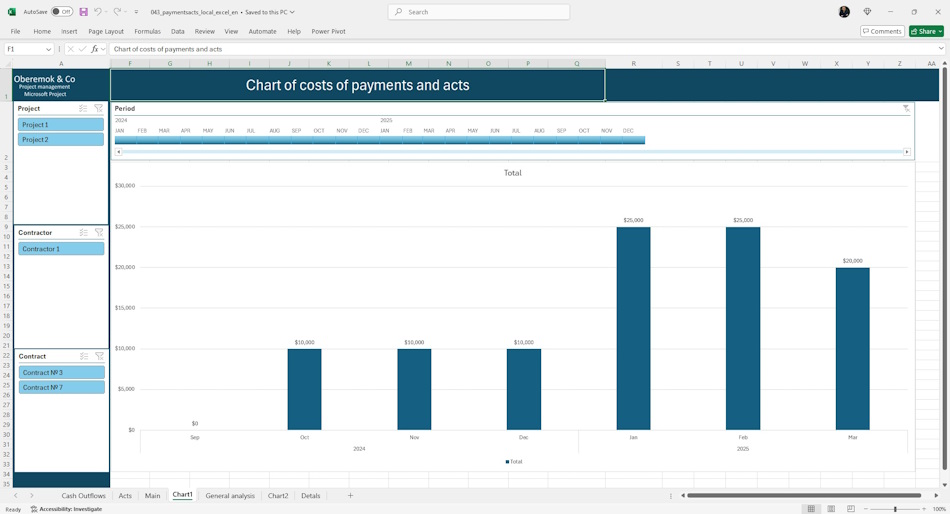
Graphical representation of general information on payments and acts of completed works in the project portfolio is shown on the page “Schedule 1”.
- Plan of payments to contractors.
- Actual payments to contractors.
- Costs of acts.
Filters are shown on the page:
- Project - filters by project name.
- Contractor - filters by contractors.
- Contract - filters by contract name.
- Period - filter by time periods.
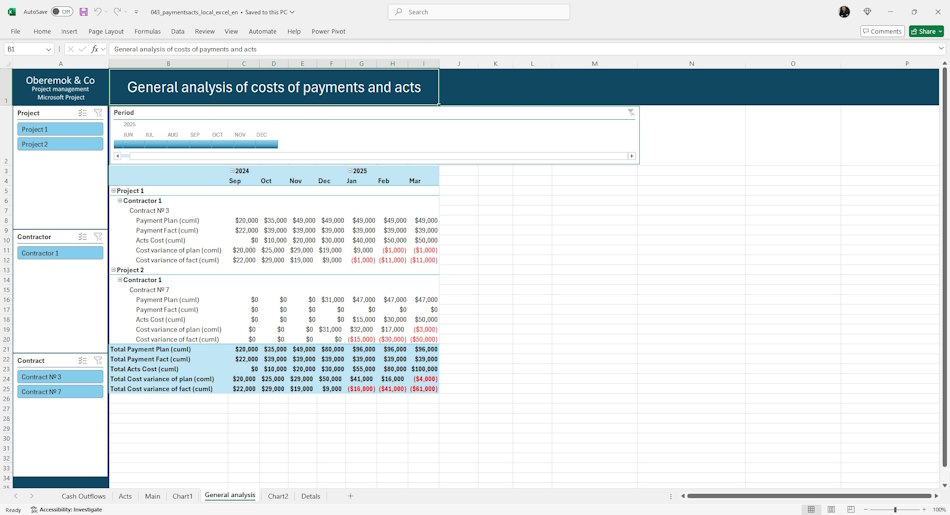
Quite often payments and work performed certificates differ by time periods, and to make the right decision it is necessary to analyze the work with contractors by analyzing the indicators taking into account the previous periods, i.e. cumulative total. The page “General analytics” displays information about the costs on an accrual basis by time periods:
- Plan payments (accrual) - the sum of planned payments under the contract cumulatively.
- Actual payments (increment) - the sum of actual payments under the contract on an accrual basis.
- Costs of the act (increment) - the sum of work performed under the contract on an accrual basis.
- Deviation on planned payments (increment) - the difference between the costs of planned payments and the costs of acts of work performed under the contract on an accrual basis. By this indicator you can evaluate the quality of planning of contract payments.
- Deviation on actual payments (growth) - the difference between the cost of actual payments and the cost of certificates of completed works on an accrual basis. By this indicator you can evaluate the quality of contract security.
Filters are shown on the page:
- Project - filters by project name.
- Contractor - filters by contractors.
- Contract - filters by contract name.
- Period - filter by time periods.
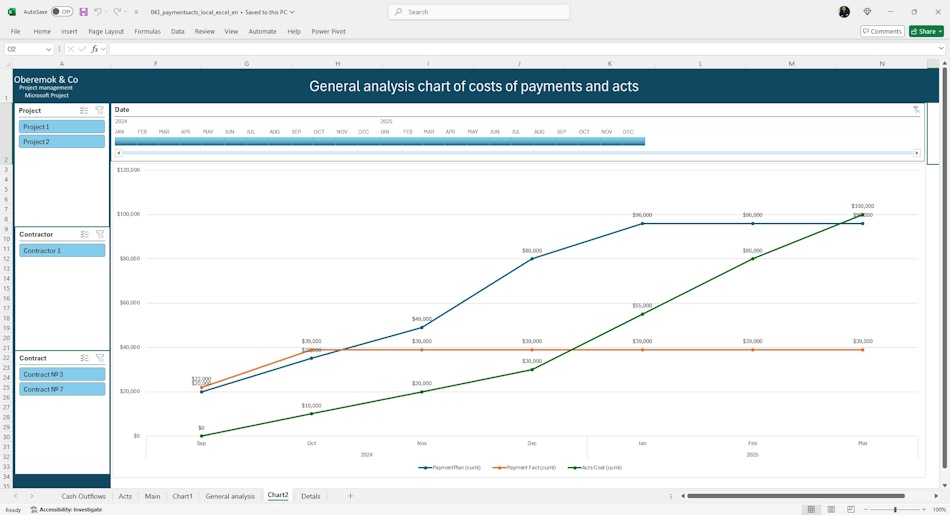
A graphical representation of the total information on payments and acts of work performed cumulatively in the project portfolio is shown on the page “Schedule 2”.
- Plan of payments to contractors in cumulative total.
- Actual payments to contractors on an accrual basis.
- Costs of acts in cumulative total.
Filters are shown on the page:
- Project - filters by project name.
- Contractor - filters by contractors.
- Contract - filters by contract name.
- Period - filter by time periods.
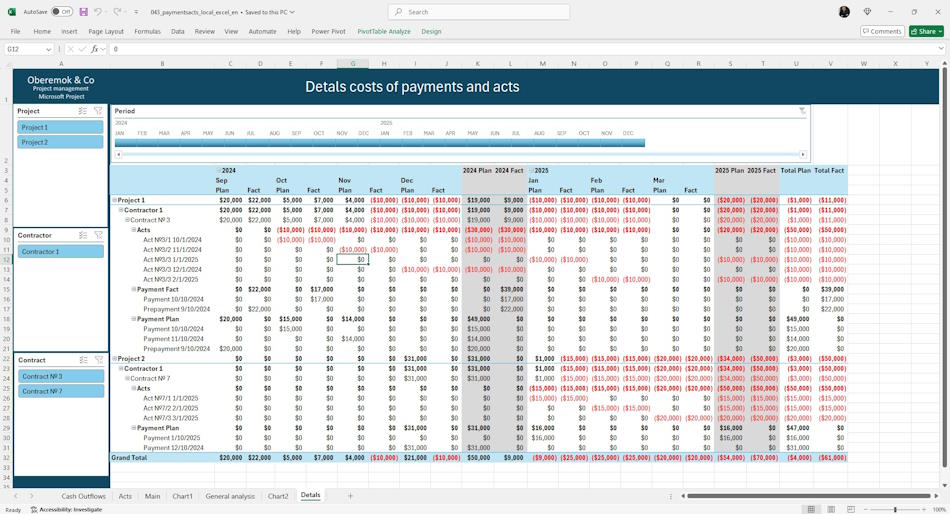
For more detailed analysis of payments go to the “Details” tab. On this tab you can see acts and payments of contracts by projects with detailed costs by projects and contracts. On this tab you can find errors in the planning or execution of payments and acts of contracts of the project portfolio.
The summarized values for projects, contractors and contracts show the deviation between planned and actual should be zero.
Filters are shown on the page:
- Project - filters by project name.
- Contractor - filters by contractors.
- Contract - filters by contract name.
- Period - filter by time periods.
Customization of the “Acts of completed works of the project portfolio” register in MS Excel
How to get the document "Acts of completed works of the project portfolio" in MS Excel
- Register or log in to the site.
- Make a payment.
- Download the file with the document.
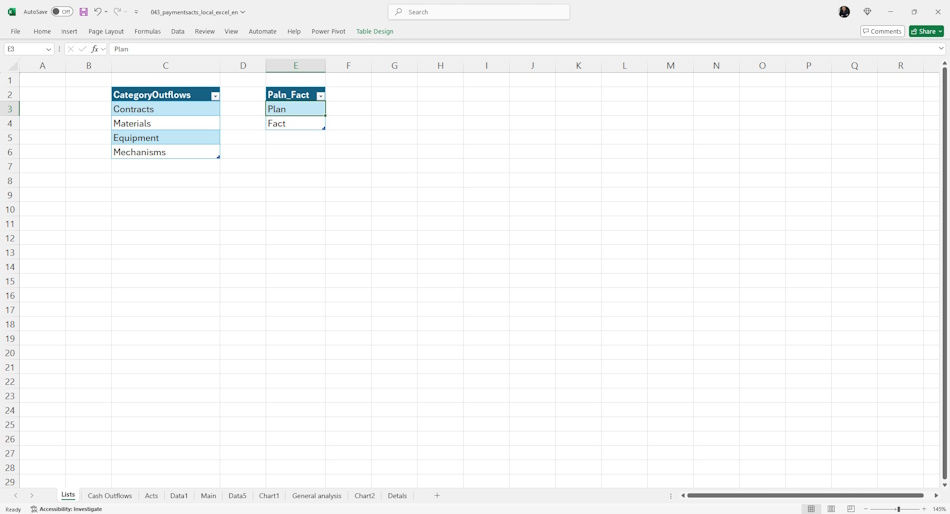
The register uses reference books of the main register fields. They ensure ease of filling and avoid errors and inaccuracies when filling.
The following reference books are used in the register:
- Payment items - a reference book of the list of payment items in the portfolio. The most typical items are: "Contractors", "Materials", "Equipment" and "Mechanisms".
Documents
- Send email: info@pmhub.pro
- Write to Telegram: +38 (097) 906-95-62. Send request
- Write on Whatsapp: +38 (097) 906-95-62. Send request
- Write on Viber: +38 (097) 906-95-62. Send request
- Call the phone: +38 (097) 906-95-62

Author: Ivan Oberemok
