
Analysis of contracts and portfolio lots in MS Excel
Contents:
- Project portfolio lots in MS Excel dashboard
- Project portfolio contracts in MS Excel dashboard
- Project portfolio contractors in MS Excel dashboard
- Customise the ‘Contracts and lots of the project portfolio’ dashboard in MS Excel
- Chat
Project portfolio lots in MS Excel dashboard
The table ‘Portfolio Lots’ provides information on the tasks of the projects allocated to lots, but no contracts have been concluded for them. The table provides information on:
- Name of lot group.
- Name of lots.
- Project name.
- Name of tasks.
- Base cost of tasks.
- Planned cost of tasks.
- Deviation in task costs.
- Actual task costs.
- Remaining task costs.
The table ‘Portfolio lots’ is used to control the declared project lots and to plan the work on concluding project contracts.
You can use filters in the ‘Portfolio lots’ table:
- Project Portfolios - filter by the company's project portfolios.
- Project Types - filter by project types.
- Project Stages - filter by project stages.
- Lots - filter by lot types.
- Lot - filter by lots.
- Contracts - filter for selecting lots with and without contracts.

Project portfolio contracts in MS Excel dashboard
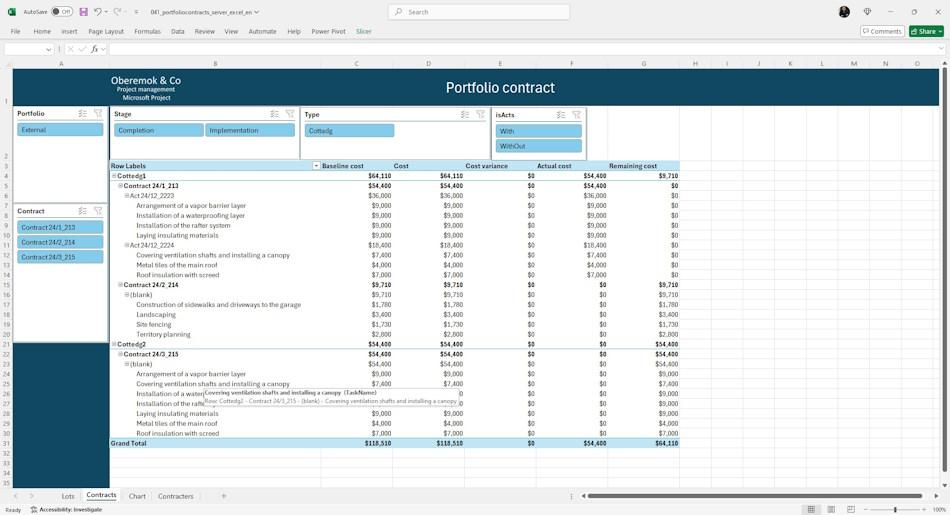
The table ‘Portfolio Contracts’ provides information about already concluded contracts in the project. The table provides information on:
- Project name.
- Contract number.
- Name of certificates of completed works.
- Name of tasks.
- Base cost of tasks.
- Planned cost of tasks.
- Deviation of task costs.
- Actual task costs.
- Remaining task costs.
The table ‘Portfolio Contracts’ is used to control project contracts and statements of work.
You can use filters in the ‘Portfolio contracts’ table:
- Project Portfolios - filter by the company's project portfolios.
- Project Types - filter by project types.
- Project Stages - filter by project stages.
- Contracts - filter by portfolio contracts.
- Acts - filter by portfolio acts.
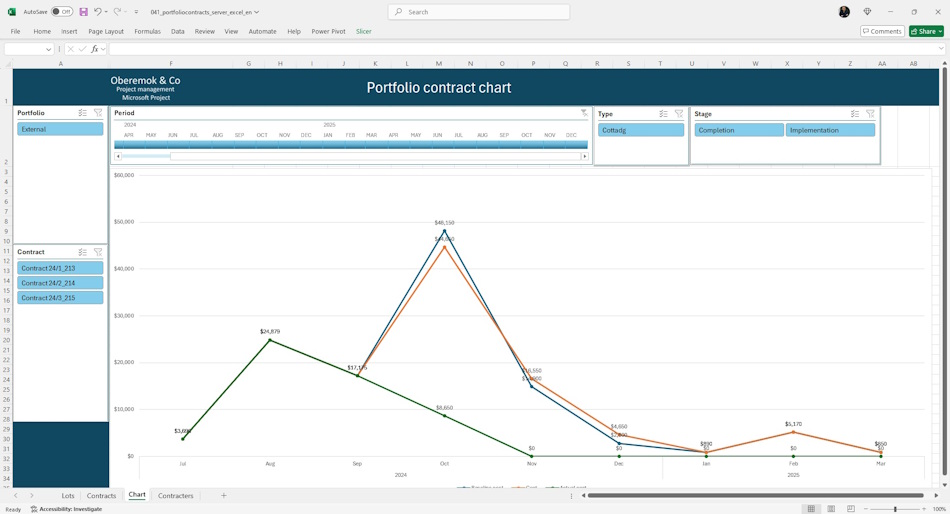
The schedule of contract costs of the project portfolio allows you to monitor contract costs by period. The graph provides information on:
- Base contract costs.
- Planned contract costs.
- Actual contract costs.
You can use filters on the page:
- Project portfolios - filter by the company's project portfolios.
- Period - filter by time periods.
- Project Types - filter by project types.
- Project Stages - filter by project stages.
- Contracts - filter by portfolio contracts.
Project portfolio contractors in MS Excel dashboard
The table ‘Portfolio contractors’ provides information on contracts and acts of the project portfolio with grouping by contractors. The table provides information on:
- Contractors name.
- Contract number.
- Act number.
- Name of tasks.
- Percentage of task completion.
- Scheduled start of task.
- Planned end of task.
- Deviation on completion.
- Task cost.
- Deviation by task costs.
The table ‘Portfolio contractors’ is used to control the project contract with distribution by contractors.
You can use filters in the ‘Portfolio contractors’ table:
- Project portfolios - filter by the company's project portfolio.
- Projects - filter by project name.
- Contractors - filter by contractors.
- Project Types - filter by project types.
- Project Stages - filter by project stages.
- Period - filter by time periods.
- Contracts - filter by portfolio contracts.
- Acts - filter by portfolio acts.

Customise the ‘Contracts and lots of the project portfolio’ dashboard in MS Excel
How to get the dashboard “Contracts and lots of the project portfolio” in MS Excel
- Register or log in.
- Make a payment.
- Download the file with the report.
How to customize the dashboard in MS Excel
- Download MS Excel and log in with your account.
- Open the report in MS Excel.
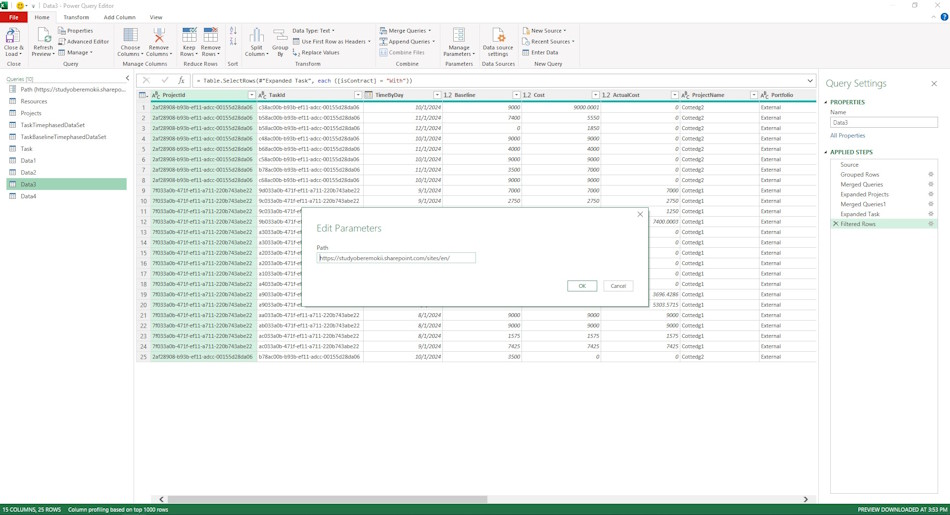
- Go to “Data” menu, “Get Data” item and sub-item “Launch Power Query Editor”.
- To do this, click on the “Path” parameter and replace the line “https://studyoberemokii.sharepoint.com/sites/en/” with your server address.
- Go to the “Home” menu item and the “Refresh Preview” sub-item.
- Refine the portfolios and portfolio types in the “Projects” table and the resource groups in the “Resources” table.
- In the same “Home” menu item, click the “Close & Load” button.
Documents

Author: Ivan Oberemok
