
Portfolio cash flows in MS Excel
Contents:
- Using the "Portfolio cash flow" document in MS Excel
- Analysis of portfolio cash flow in MS Excel
- Setting up the "Portfolio cash flow" document in MS Excel
- Chat
Using the "Portfolio cash flow" document in MS Excel
Portfolio cash inflows – a list of planned and actual receipts in the project from the company owners, investors, and clients of the company. The list of payments indicates:
- Category – the item for which the payment will be taken into account.
- Contracter – the name of the company or the name of the individual who makes the payment.
- Contract – the number and date of the agreement on the basis of which we receive the payment.
- Payment description
- Payment date
- Payment amount
- Type – the field has the values “Plan” or “Fact”. This separates planned and actual payments.

Portfolio cash outflows – a list of planned and actual payments to project counterparties for work, materials and portfolio equipment. The list of payments specifies:
- Category – the item under which the payment will be recorded.
- Contracter – the name of the company or the name of the individual making the payment.
- Contract – the number and date of the agreement on the basis of which we make the payment.
- Payment Description
- Payment Date
- Payment Amount
- Type – the field has the values “Plan” or “Fact”. This separates planned and actual payments.

Analysis of portfolio cash flow in MS Excel
Based on cash flow data, general information on portfolio costs is calculated. The calculation presents planned and actual information on portfolio receipts and costs. The profit and ROI of the project are calculated, as well as the deviation for each parameter.

Using information about payments to portfolio, we can conduct an analysis and identify cash gaps or inefficient use of funds in portfolio accounts.
The Analysis page presents a cash flow model with grouping by items of both receipts and payments of the portfolio. The table presents the data:
- Cash receipt plan
- Cash receipt plan cumulative total
- Fact of cash receipt
- Fact of cash receipt cumulative total
- Payment plan
- Payment plan cumulative total
- Fact of payments
- Fact of payments cumulative total

The cash flow chart shows the overall level of cash inflows and outflows in a portfolio.

In a detailed analysis of the portfolio's funds, all planned and actual values of payments and expenses in the portfolio are displayed in one model.
This model shows not only the total amounts, but also the names of the counterparties, contracts, dates and descriptions of payments.

This model shows not only the cumulative total amounts, but also the names of the counterparties, contracts, dates and descriptions of payments.

Setting up the "Portfolio cash flow" document in MS Excel
How to get the document "Portfolio cash flow " in MS Excel
- Register or log in to the site.
- Make a payment.
- Download the file with the document.
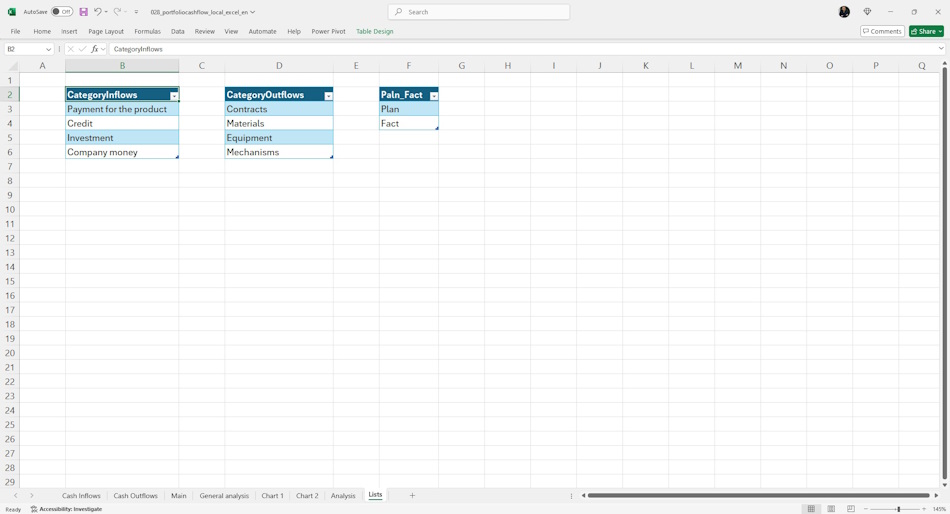
The register uses reference books of the main register fields. They ensure ease of filling and avoid errors and inaccuracies when filling.
The following reference books are used in the register:
- Income items - a reference book of the list of items of sources of cash receipts in the portfolio. The most common items are: "Equity", "Product payment", "Investments" and "Loans".
- Payment items - a reference book of the list of payment items in the portfolio. The most typical items are: "Contractors", "Materials", "Equipment" and "Mechanisms".
Documents

Author: Ivan Oberemok
