
Portfolio interaction management report in MS Power BI
Contents:
- Using the "Portfolio interaction management" report in MS Power BI
- Setting up the "Portfolio interaction management" report
- Chat
Using the "Portfolio interaction management" report in MS Power BI
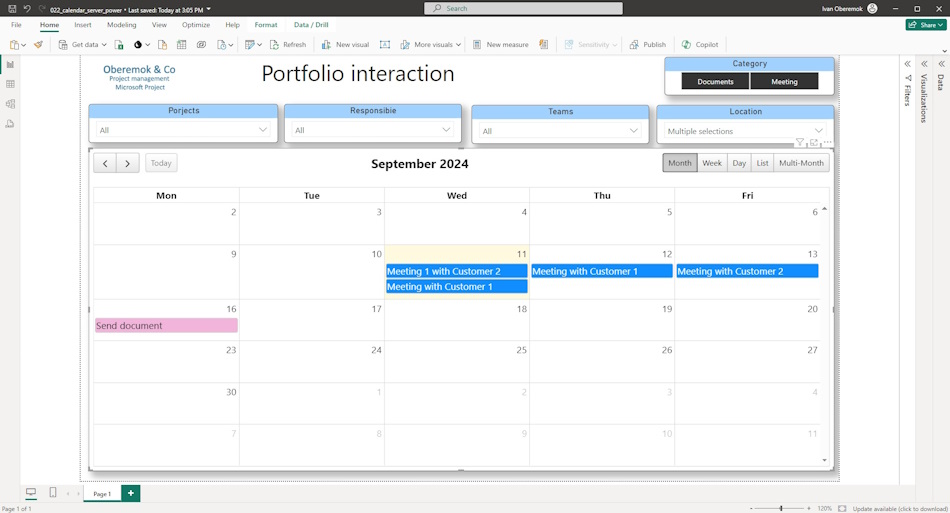
The "Project Portfolio Interaction Management" report is used by both project team members and project office employees.
It would be correct to appoint a person responsible for managing interactions in the portfolio projects in the project office.
A typical interaction planning procedure consists of the following steps:
- The project administrator, together with the project manager, draws up an interaction management plan.
- The project administrator enters information about interaction measures into the corporate register on the MS Project Server server.
- A responsible person from the project team is assigned to each event.
- The responsible person clarifies information about the interaction event.
- The project administrator organizes the event.
- The project office specialist and project administrators monitor the implementation of interaction events.
You can use filters:
- Categories - the "Categories" filter allows you to select different types of events
- Project - the "Project" filter allows you to select one or more projects and their interaction events.
- Responsible - the "Responsible" filter allows you to select all events for which a specific responsible person is responsible.
- Teams - The Teams filter selects teams that should be present at the meeting.
- Location - The Location filter allows you to track the location of interaction events and reduce conflicts.
Setting up the "Portfolio interaction management" report
How to get the report in MS Power BI
- Register or log in to this site.
- Make a payment.
- Download the report file.
How to customize a report in MS Power BI
- Download MS Power BI from the link https://www.microsoft.com/en-us/download/details.aspx?id=58494.
- Install MS Power BI (consider the bitness of your operating system).
- Load MS Power BI and log in with your account.
- Open the report in MS Power BI.
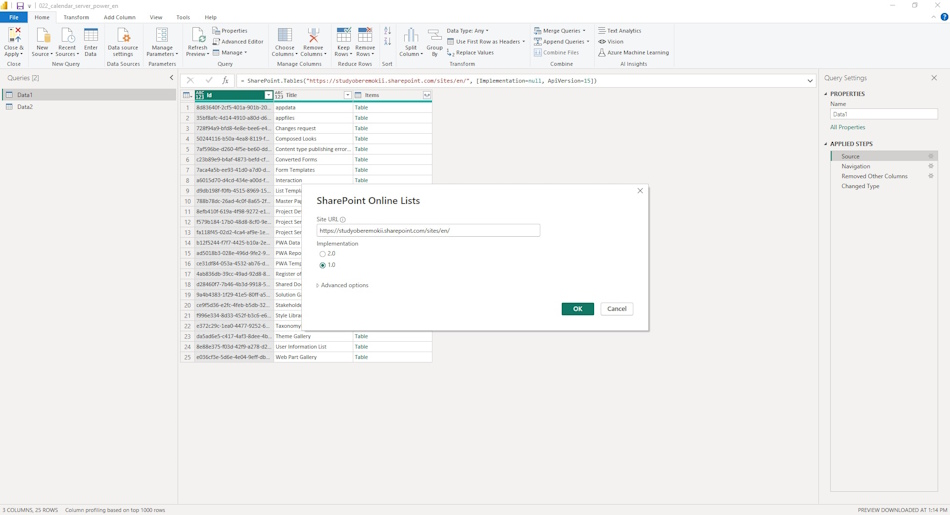
- Go to the “Home” menu item and the “Transform data” sub-item.
- Go through all the tables and change the server address.
- To do this, click on the “Source” item and replace the line “https://studyoberemokii.sharepoint.com/sites/en/” with the address of your server.
- Go to the “Home” menu item and the “Update all” sub-item.
- In the same “Home” item, click the “Close and Apply” button.
#projectportfoliomanagement, #projectcommunicationsmanagement, #monitoringandcontrollingprocess, #msprojectserver, #mspowerbi, #oberemokii, #documents
Documents
Documant title: "Portfolio interaction management" report in MS Power BI
Price: € 10 / 520 UAH
Description: The "Portfolio Interaction Management" is a report describing the list of interaction tasks. This plan includes all the activities that the project team plans to carry out. The interaction activities that directly affect the process of forming the project
- Send email: info@pmhub.pro
- Write to Telegram: +38 (097) 906-95-62. Send request
- Write on Whatsapp: +38 (097) 906-95-62. Send request
- Write on Viber: +38 (097) 906-95-62. Send request
- Call the phone: +38 (097) 906-95-62

Author: Ivan Oberemok
