
Portfolio change request registry in MS Excel
Contents:
- Using the "Portfolio change request registry" document in MS Excel
- Analysis of portfolio change requests registry in MS Excel
- Setting up the "Portfolio change request registry" document in MS Excel
- Chat
Using the "Portfolio change request registry" document in MS Excel
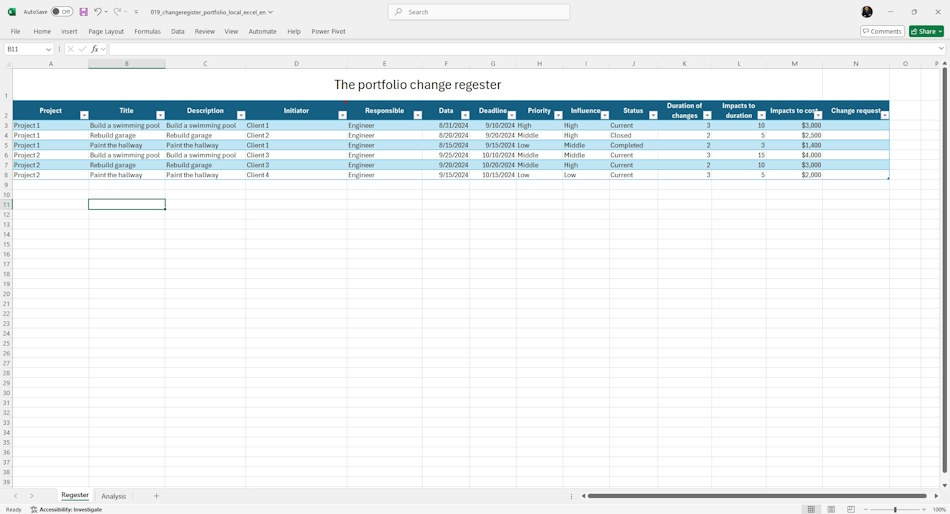
The project portfolio change request register in MS Excel is a document containing a description of all change requests in the projects of the portfolio. Project teams record all change requests from stakeholders in one document. Management of the work on analysis and introduction of changes is carried out by project managers.
The "Portfolio Change Request Register" document in MS Excel allows you to quickly and conveniently record information about change requests in portfolio projects and manage or. Project administrators record all change requests, and project managers, together with teams, evaluate and implement them in the project. Project office specialists evaluate the quality of work with change requests.
- The project administrator enters information about incoming change requests into the register.
- The project manager, together with the project team, analyzes the incoming requests and evaluates the degree of their impact on the project deadlines and costs.
- The project manager coordinates the analysis results with stakeholders and appoints a person responsible for making changes to the project.
- Responsible team members make the changes assigned to them in the project documents.
- Project office specialists analyze the quality of work with change requests.
Analysis of portfolio change requests registry in MS Excel
The report uses filters:
- Initiator - a list of initiators of changes in the project.
- Responsible - a list of team members responsible for making changes.
- Period - a filter that allows you to select changes by deadlines.
- Priority. The "Priority" filter allows you to select the highest priority change requests.
- Influence. The "Influence" filter allows you to select requests with the highest level of influence on the project.
- Status. The "Status" filter selects requests depending on their status. "Active" - a change request that is still awaiting processing. "Closed" - a request that has been rejected by the initiator. "Implemented" - changes to the request have been made to the project.

Setting up the "Portfolio change request registry" document in MS Excel
Register or log in to the site.
- Make a payment.
- Download the report file.
The registry uses reference books of the main registry fields. They make it easy to fill in and avoid errors and inaccuracies when filling in.
The following reference books are used in the registry:
- Priorities - a reference book of the list of priorities for change requests. The speed of response to changes depends on the priority. The higher the priority, the faster the team will gather to organize the introduction of changes.
- Influence - a reference book of the list of possible influence levels. The higher the level of influence, the higher the level of the organization's managers must be involved in making decisions on making changes.\
- Status - a reference book of the request status in the registry. The status allows you to filter out changes that have already been made or are pending.

Documents

Author: Ivan Oberemok
