
Collection of the fact of task completion by responsible persons MS Excel
Contents:
- Using the document "Collection of the fact of task completion by responsible persons" in MS Excel
- How to get the Document "Collection of the fact of task completion by responsible persons" in MS Excel
- Chat
Using the document "Collection of the fact of task completion by responsible persons" in MS Excel
The document "Collection of the fact of task completion by those responsible" in MS Excel allows you to quickly and conveniently collect facts of task completion from those responsible.
The procedure for working with the document "Collection of the fact of task completion by responsible persons" in MS Excel.
- Project managers plan tasks in project schedules.
- Project managers publish project schedules.
- Responsible persons open the document "Collection of the fact of task completion by responsible persons" in MS Excel.
- Responsible persons select their name in the "Responsible person" filter and the "Current" value in the "Period" filter.
- Responsible person sets the value in the "New % completion" field.
- Responsible person saves the file.
- The project manager selects his project in the report and transfers the values from the "New % completion" field to the "% volume" column in the project schedule.
- The project manager agrees on deviations in task completion with responsible persons and performers.
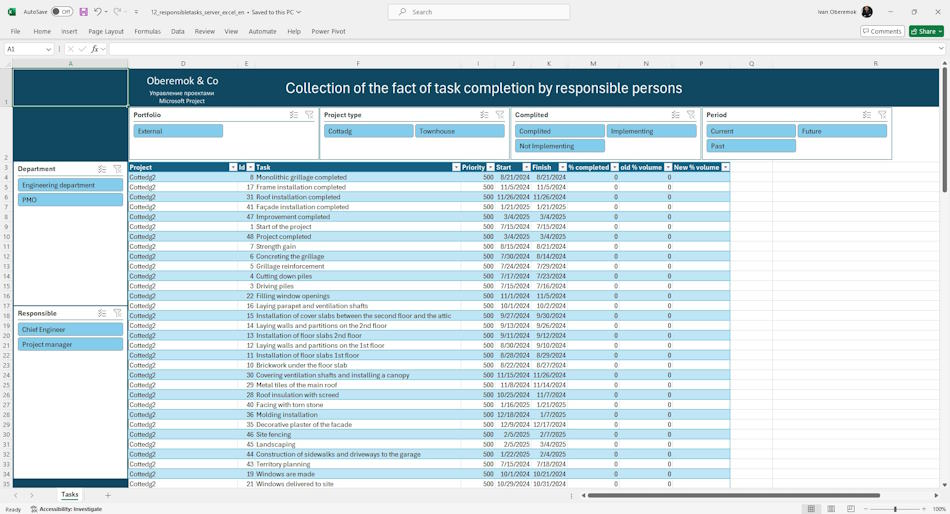
The following filters are used in the report:
- Department. The "Department" filter allows you to select tasks from specific departments.
- Responsible. The "Responsible" filter allows you to select tasks from specific responsible.
- Portfolio. The "Portfolio" filter allows you to select the desired portfolio and project types.
- Project types. The "Project types" filters allow you to select projects of a certain type.
- Complited. The "Execution" filter allows you to see which tasks have already been completed, which are being completed, and which have not yet been completed.
- Period. The "Period" filter allows you to filter out tasks from the past period, current tasks, and tasks from future periods.
How to get the Document "Collection of the fact of task completion by responsible persons" in MS Excel
Register or log in to the site.
- Make a payment.
- Download the report file.
- How to customize a report in MS Excel
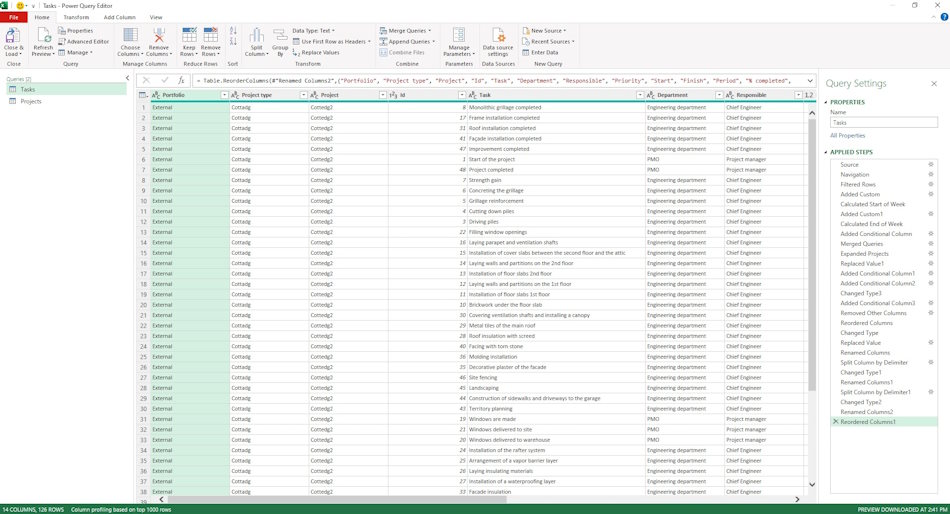
Load MS Excel and log in with your account
- Open the report in MS excel
- Go to the “Data” menu, the “Get data” item and the “Launch Power Query editor” sub-item
- Change the server address for the table.
- To do this, click on the “Source” item and replace the line “https://studyoberemokii.sharepoint.com/sites/en/” with the address of your server.
- Go to the “Home” menu item and the “Update preview” sub-item.
- Go through all the steps and update the column names in the queries
- In the same “Home” item, click the “Close and Apply” button
#projectportfoliomanagement, #projectscopemanagement, #executingprocess, #msexcel, #oberemokii, #documents
Documents
Documant title: Collection of the fact of task completion by responsible persons MS Excel
Price: € 10 / 520 UAH
Description: The document "Collection of the fact of task execution by those responsible" in MS Excel allows collecting the fact of execution of portfolio project tasks by those responsible for the tasks. Project managers transfer the fact of execution to the project,

Author: Ivan Oberemok
