
Project request registry analysts report in MS Excel
Contents:
- Using the "Project request registry analysts" report in MS Excel
- Setting up the “Project request registry analysts” report in MS Excel
- Chat
Using the "Project request registry analysts" report in MS Excel
The “Analysts of the register of requests for projects” report in MS Excel is a tool that provides analysis of the description of the company’s strategy in future projects. This report also allows you to analyze the effectiveness of planning the company's future projects.
The “Project Request Registry Analysts” report in MS Excel is filled out based on data from the project request registry in MS SharePoint. The Project Request Register is a user-created tool based on MS Project Server (server). Before using this report, you must create a project request register and populate it with information.
An assessment of the completion of the project request register is carried out using the analysis page. Using various filters (slices), project office specialists, together with company management, evaluate the quality of filling out the register of requests for the project.

The following sections were created in the presented report:
- Location - the location of the project or the location of a subsidiary.
- Customer – the title or name of the project customer.
- Initiator – The unit that initiated the project.
- Start – year or quarter of the start of the project.
- Group – a portfolio or sub-portfolio of projects.
- Type of projects – a specific technology for implementing the project.
- Status – status of the project request
The assessment is carried out based on an analysis of the profitability and profitability of portfolio projects. The portfolio budget is also affected by development projects that do not have income, but their results increase the profitability of external projects.
The project office, together with the company's management, analyzes the register of requests for the project in order to better plan and further implement them.
Setting up the “Project Request Registry Analysts” report in MS Excel
How to get the Project Request Registry Analysts report in MS Excel
- Register or log in to the site.
- Make a nominal payment.
- Download the report file.
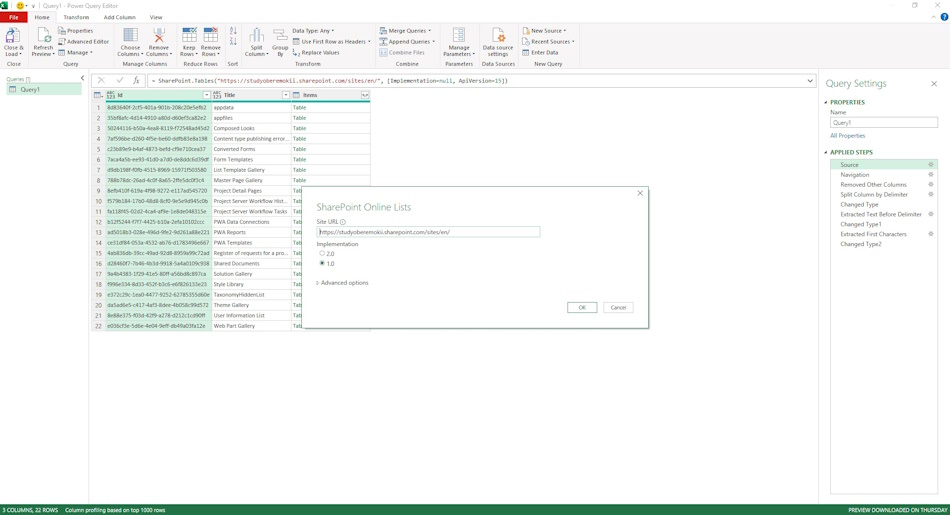
How to customize a report in MS Excel
- Download MS Excel and log in with your account.
- Open the report in MS Excel.
- Go to the “Data” menu, the “Get data” item and the “Launch Power Query editor” sub-item
- Change the server address for the table.
- Click on the “Source” item and replace the line “https://studyoberemokii.sharepoint.com/sites/ru/” with the address of your server.
- Go to the “Home” menu item and the “Update Preview” sub-item.
- Go through all the steps and update the column names in the queries.
- In the same “Home” item, click the “Close and Apply” button.
Documents


Author: Ivan Oberemok
