
Top-Down cost planning in MS Project Server
Contents:
Top-Down cost planning in MS Project Server
Top-down cost planning method involves the distribution of project costs from the total amount to the costs of specific tasks. This method is used to estimate project costs in advance. We recommend allocating costs from the top level to the bottom.

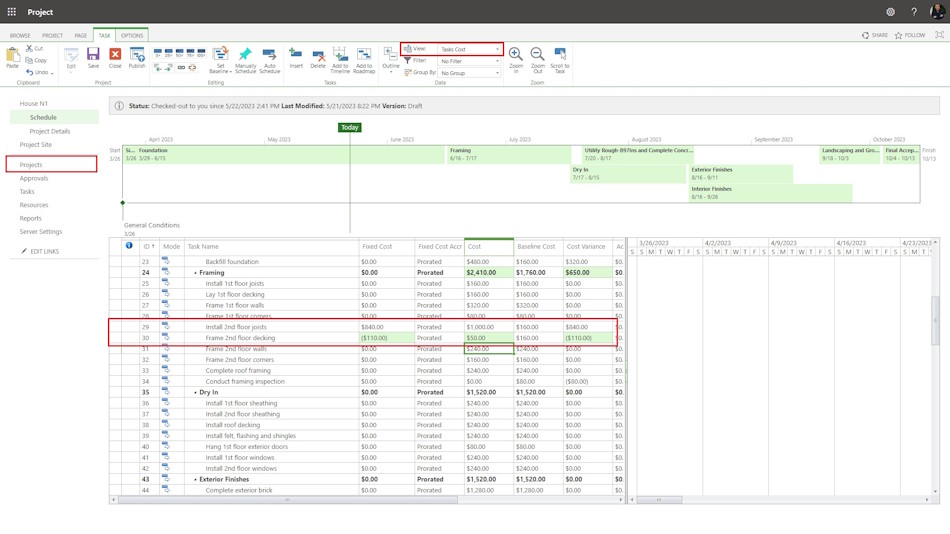
Steps to set fixed cost in summary tasks in MS Project Pro:
- Open MS Project Server
- Click the "Projects" item in the left menu.
- Click the project name.
- Click the "TASK" item in the top menu.
- Click the "Edit" button in the "Project" block.
- Choose the "In Browser" item.
- Choose the "Task Cost" view in the "View:" field.
- Enter the task cost in the "Fixed Cost" column.
- You can enter the task cost in the "Cost" column. This cost will be added to the resource cost.
- You can enter the cost to the summary tasks.
- To save click the "Save" button in the "Project" block.
#projectportfoliomanagement, #projectcostmanagement, #planningprocess, #msprojectserver, #oberemokii

Author: Ivan Oberemok
