
Delete enterprise projects and resources in MS Project Server
Contents:
Delete a project in MS Project Server
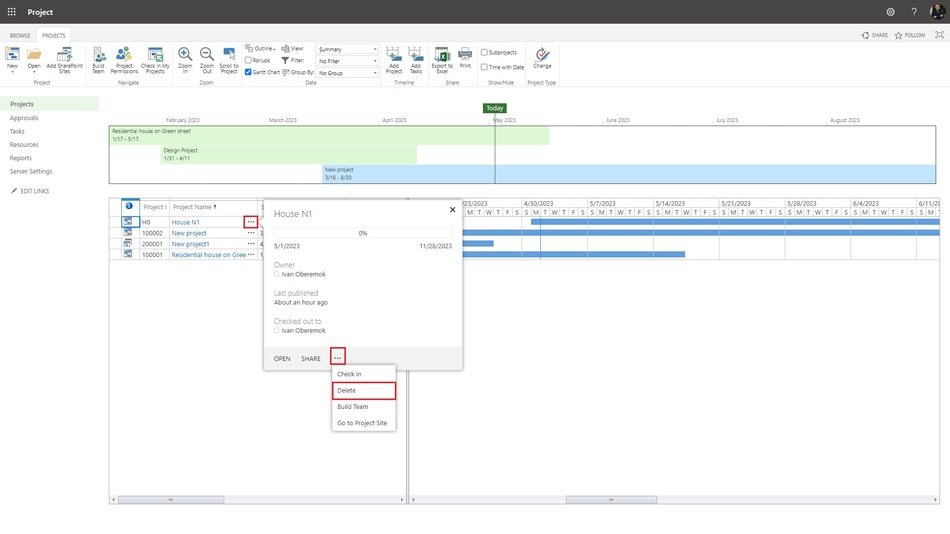
Steps to delete a project in MS Project Server:
- Open MS Project Server.
- Click the "Projects" item in the left menu.
- Click the ellipsis near the project name.
- Click the ellipsis in the window.
- Choose the "Delete" item.
Delete enterprise objects in MS Project Server
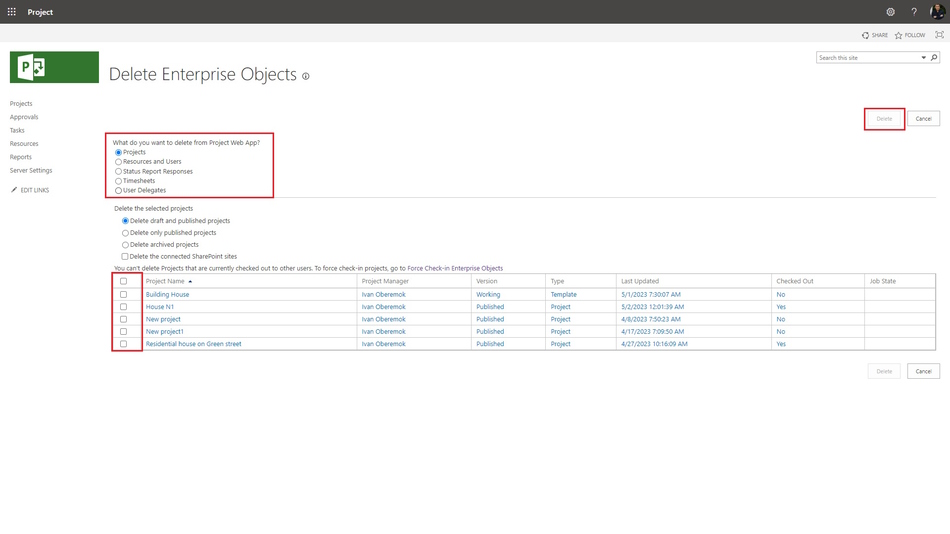
Steps to delete enterprise objects in MS Project Server
- Open MS Project Server.
- Click the "Server Settings" item in the left menu.
- Click the "Delete Enterprise Objects" link in the "Queue and Database Administration" block.
- Select the enterprise object.
- If you want to delete the enterprise project plan select the project type in the "Delete the selected projects" block.
- If you want to delete the project site click the "Delete the connected SharePoint sites" box.
- Click the "Delete" button.
#projectportfoliomanagement, #projectintegrationmanagement, #planningprocess, #msprojectserver, #oberemokii

Author: Ivan Oberemok
