
Opening the project plan in MS Project Pro from MS Project Server
Contents:
Opening the project plan from MS Project Server
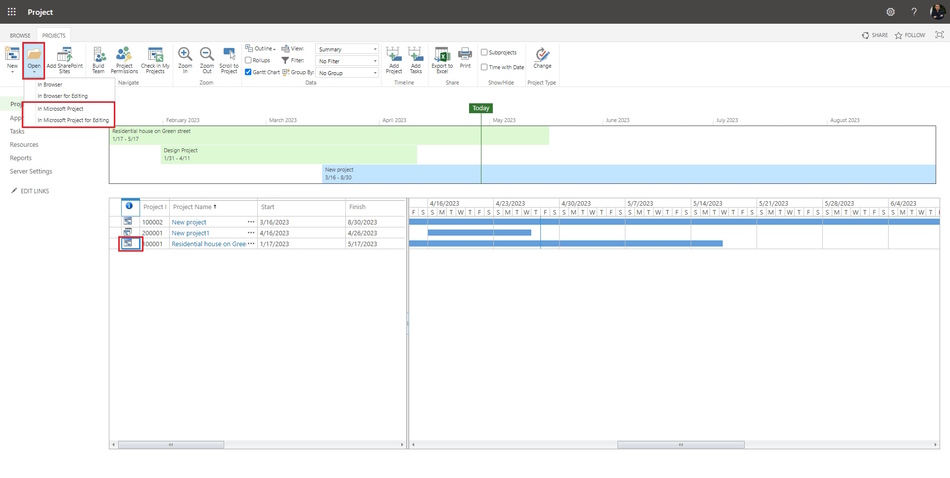
Steps to open the project plan from MS Project Server:
- Click the "Projects" item in the left menu.
- Select the project plan.
- Click the "Open" item in the top menu.
- Click the "In Microsoft Project" item.
- Or
- Click the button in the "Indicator" column.
Opening the project plan from MS Project Pro
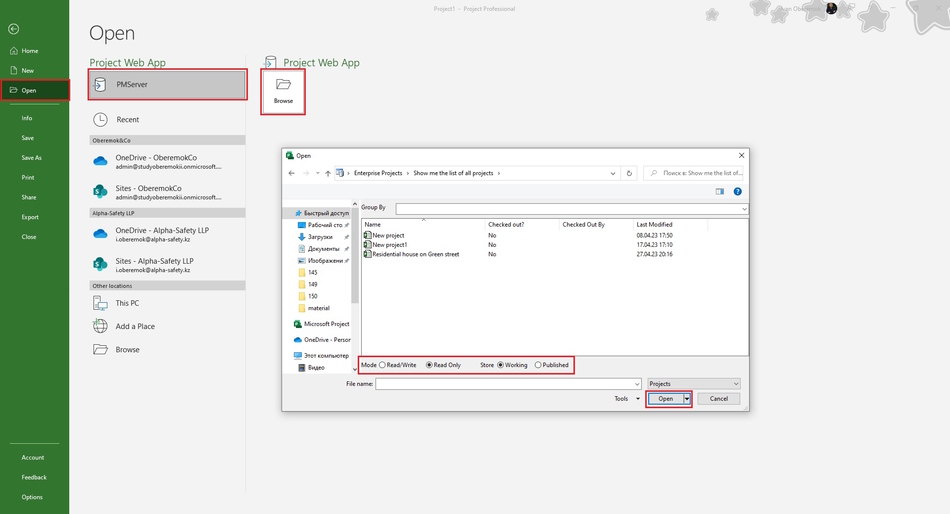
Steps to open the project plan from MS Project Pro:
- Open the MS Project Pro
- Click the "File" item in the top menu.
- Click the "Open" item in the left menu.
- Click the button with server name.
- Click the "Browse" button.
- Click the "Show me list of all projects" string.
- Select the type store: working or published.
- Select project name.
- If you want to edit plan, select the "Read/Write" open mode.
- If you want to show plan, select the "Read Only" open mode.
- Click the "Open" button.
#projectmanagment, #projectintegrationmanagement, #initiatingprocess, #msprojectpro, #msprojectserver, #oberemokii

Author: Ivan Oberemok
