
Fixing project issues in MS Project Pro
Contents:
- Fixing project issues in tasks note in MS Project Pro
- Fixing project issues in the costum column in MS Project Pro
- Chat
Fixing project issues in tasks note in MS Project Pro
The most convenient way to fix project problems is to use tasks note.
Steps to enter issues in tasks note in MS Project Pro:
- Open the Gantt chart view.
- Select the task.
- Click the "Information" button in the "Properties" block.
- Or Double-click to the task.
- Click the "Notes" tub.
- Enter task issues.

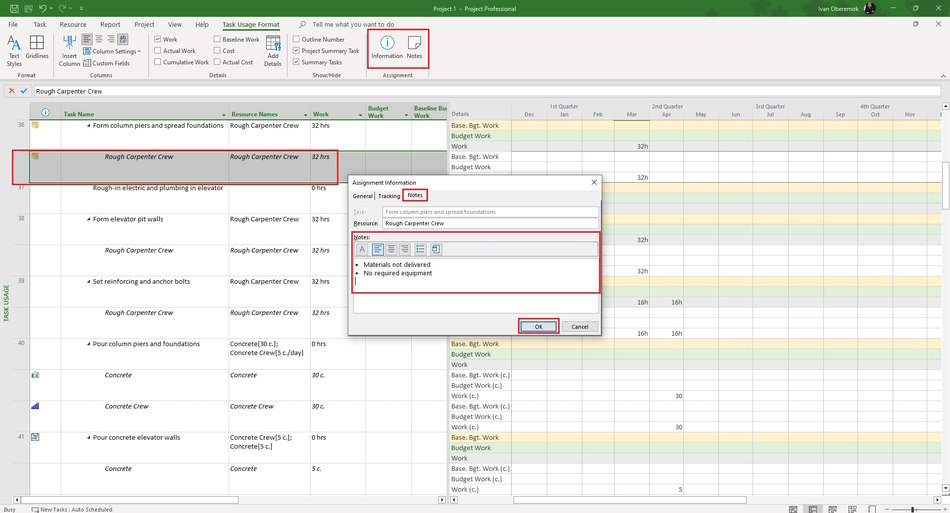
You can specify resource issues when implementing a task. You can specify issues on the resource assignment
Steps to enter issues in assign note in MS Project Pro:
- Open the task usage view.
- Open the task and select the resource.
- Click the "Task Usage Format" item in the top menu.
- Click the "Information" button in the "Properties" block.
- Or Double-click to the resource.
- Click the "Notes" tub.
- Enter task issues.
Fixing project issues in the custom column in MS Project Pro
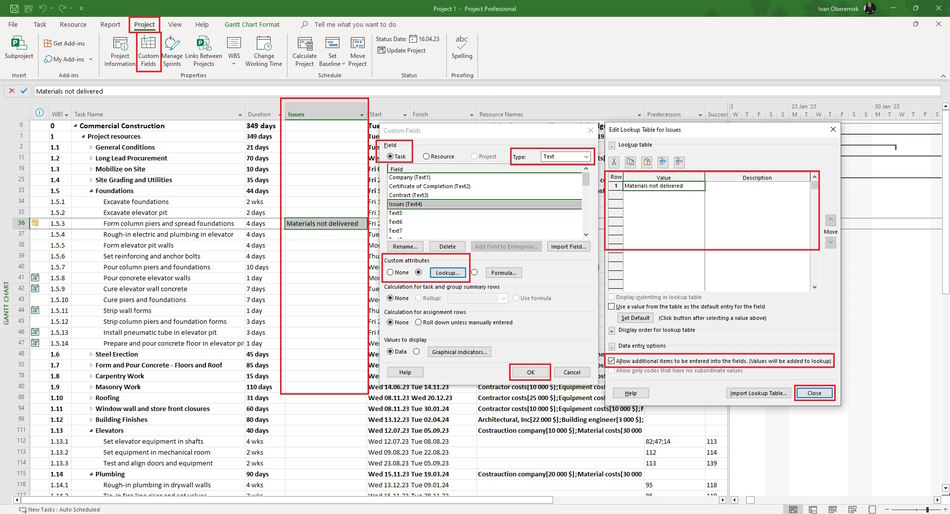
To use issues information in reports for analysis, you can add a custom column. In this column, the project manager will record the issues of the task. The system can fix already entered values and prompt them when entering in the form of a drop-down list.
- Click the "Project" item in the top menu.
- Click the "Custom Fields" button in the "Properties" group.
- Click the "Task" task in the "Field" block.
- Select the "Text" type of field in the "Type:" field.
- Click the "Rename ..." button and enter the name of new column in the opened window. (For example "Issues")
- Click the "Lookup ..." in the "Custom attributes" block.
- Click the "Allow only codes that have no subordinate values" check box.
- Click the "Ok" button.
#msprojectpro, #oberemokii, #projectmanagment, #projectriskmanagement, #initiatingprocess

Author: Ivan Oberemok
